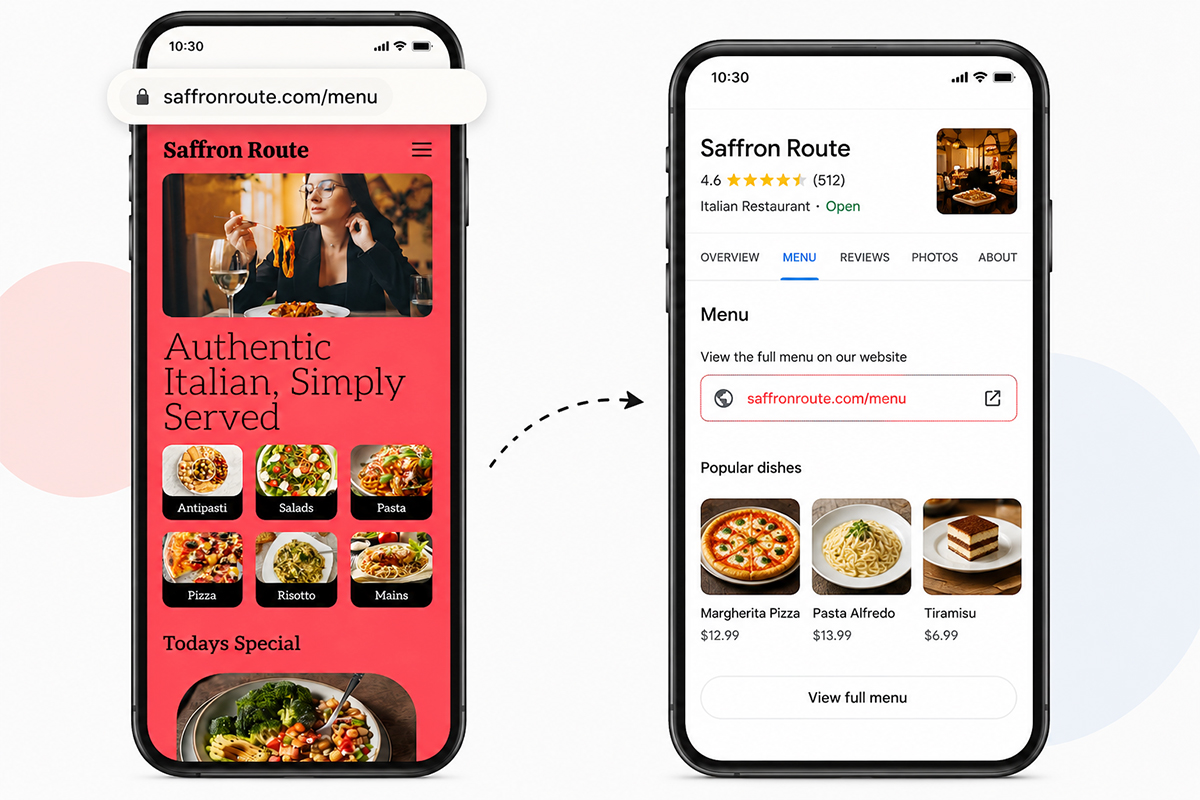
When someone searches for your restaurant on Google, they usually want more than your address and opening hours.
They want to know what you serve.
They may be looking for pizza, sushi, burgers, cocktails, vegan food, a lunch menu, or simply your prices before deciding whether to visit.
That makes your restaurant menu an important part of your Google presence.
Google Business Profile allows eligible food and drink businesses to add menu sections and items, including descriptions and prices. Restaurants can also add a menu URL and menu photos. Google says menu information can appear on Google Search and Google Maps.
But there is an important distinction:
Getting your menu onto Google is not the same as ranking #1 on Google.
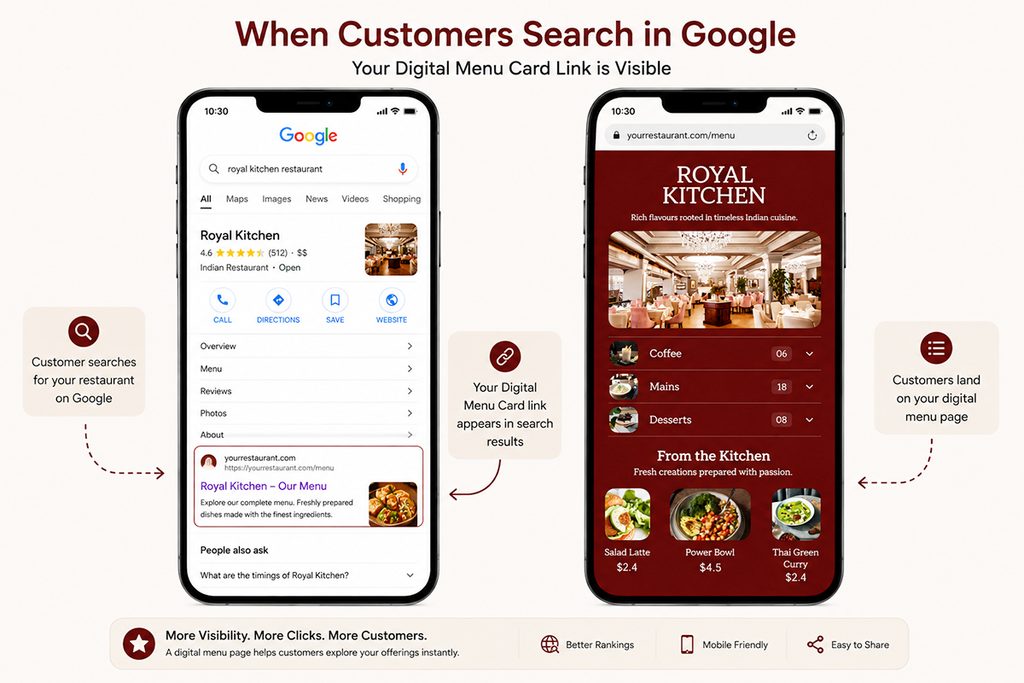
Adding accurate menu information gives Google more information about your restaurant and gives customers another way to discover what you offer. Your local ranking still depends on Google’s broader local-search systems and other business information.
This guide explains how to get your restaurant menu onto Google Search and Maps, what information to provide, how to use your own menu page, and how to keep everything accurate.
Can a Restaurant Menu Appear on Google Search and Maps?
Yes.
Google Business Profile provides restaurants and other eligible food-and-drink businesses with menu features. You can add menu sections, individual dishes, descriptions and prices, upload menu photos, and provide a URL where customers can find your menu.
When customers find your Business Profile, menu information can appear under the Menu section.
Google also says menu changes can take 24–48 hours to appear on Google Maps and Search.
Your restaurant can therefore have several menu experiences connected to Google:
- Menu items entered directly into Google
- A menu URL on your Business Profile
- Menu photos
- Menu information Google discovers from your website
- Menu information supplied by other sources
Google may compile Business Profile information from multiple sources, which is one reason keeping your menu consistent across the web matters.
Why Put Your Restaurant Menu on Google?
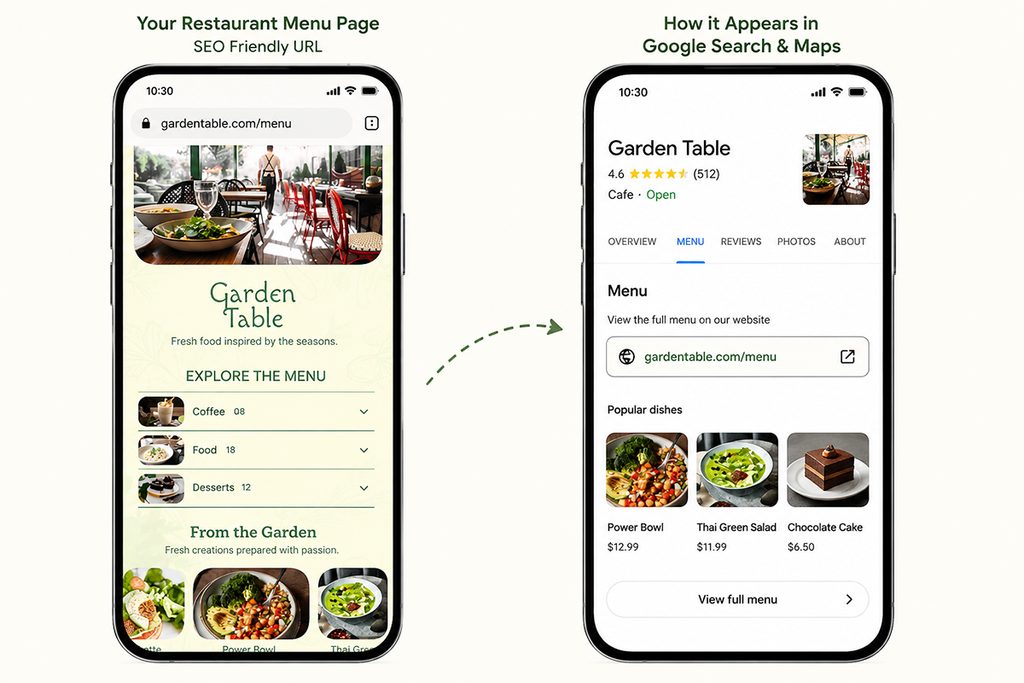
A customer searching for your restaurant is often already close to making a decision.
They may be comparing:
Restaurant A:
Menu available
Restaurant B:
No menu
If the customer wants to know whether you have vegetarian dishes, a particular cuisine, a certain price range, or a specific dish, your menu can answer that question immediately.
A Google menu can help customers:
- See what you serve
- Check prices
- Explore menu categories
- Discover individual dishes
- Decide whether your restaurant fits their needs
- Visit your website for the complete menu
- Continue to ordering or reservation options where available
Google’s restaurant documentation includes menu management as part of the Business Profile experience and also lists menu-related performance information for restaurants.
But don’t think of it as a ranking shortcut
This is important.
Adding 100 menu items to Google does not guarantee higher rankings.
There is no reason to promise a restaurant that adding a menu automatically moves it into the local pack.
Instead, think about the menu as another piece of information Google can use to understand the business and another useful resource customers can access from the profile.
The goal is:
Accurate information + better discovery + less friction for customers.
How to Add Your Restaurant Menu to Google Business Profile
There are several ways to manage your restaurant menu on Google.
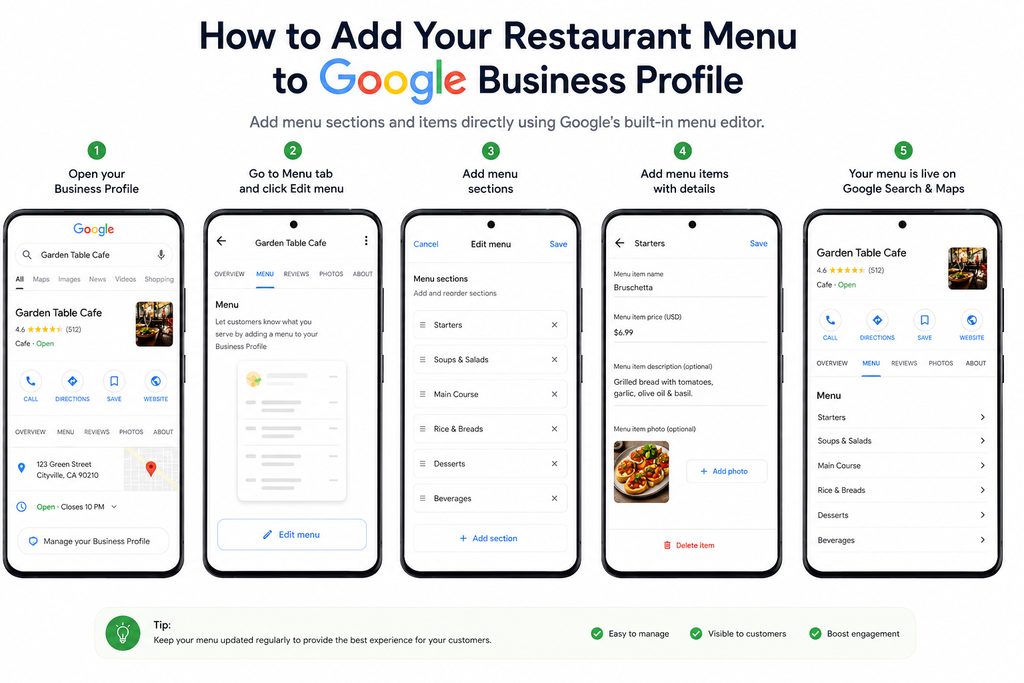
Method 1: Add Menu Items Directly to Your Business Profile
This is Google’s built-in menu editor.
According to Google’s current documentation, you can go to your Business Profile and select Edit menu. You can then add menu sections and individual menu items with their information.
A typical restaurant might organize its menu like this:
- Starters
- Soups & Salads
- Main Course
- Rice & Breads
- Desserts
- Beverages
A café might use:
- Coffee
- Tea
- Breakfast
- Sandwiches
- Desserts
- Cold Drinks
A bar might use:
- Cocktails
- Spirits
- Wine
- Beer
- Mocktails
- Bar Food
The important thing is to use sections that make sense to the customer.
Add Complete Item Information
For each important menu item, provide:
- Dish name
- Description
- Price
- Correct section
- Photo where useful
For example:
Paneer Tikka
Char-grilled cottage cheese with peppers and Indian spices.
$8.99
This is much more useful than simply entering:
Paneer Tikka — $8.99
The description helps customers understand what they are actually ordering.
Google’s menu editor is specifically designed around sections, dishes, descriptions and prices.
Method 2: Add Your Menu URL to Google
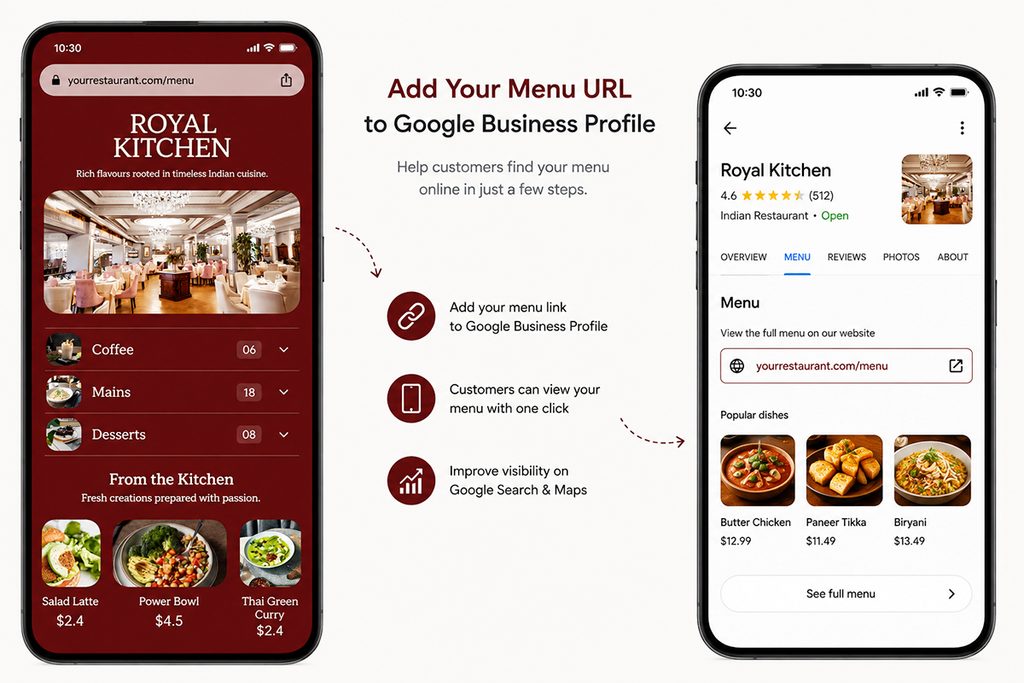
Google also allows businesses to add a menu link to their Business Profile. You can enter the URL where customers can find your menu.
This is important because your restaurant should ideally have a real menu page, not only menu information stored inside Google.
For example:
yourrestaurant.com/menu
is more useful as a long-term asset than:
yourrestaurant.com/menu.pdf
A dedicated menu page can be:
- Designed for mobile phones
- Linked from your website
- Shared on social media
- Used behind QR codes
- Added to Google
- Updated whenever your restaurant changes its menu
Google also says it may transcribe menu data from a restaurant’s website so it can appear on the Business Profile.
That makes your own menu page an important part of the overall strategy.
Method 3: Upload a Menu Photo or PDF
Google currently documents another option for restaurants: uploading a menu photo or PDF and using an experimental AI workflow to generate detailed menu information.
Google says this process can capture information such as:
- Section name
- Dish name
- Description
- Price
Google recommends reviewing the generated menu before publishing because the transcription may contain errors. It also recommends using a high-quality menu image.
This is useful if your restaurant already has a printed menu.
But there is a limitation.
A photograph or PDF is not the same as maintaining a structured, live menu on your own website.
If your price changes tomorrow, you still need to make sure the current information exists everywhere it needs to.
The Best Setup: Google + Your Own Menu Page
For most restaurants, the strongest setup is not:
Google OR website
It is:
Google + website + menu URL + consistent menu information
Think of it as four layers:
| Layer | Purpose |
|---|---|
| Google Business Profile | Discovery |
| Your website menu page | Owned menu destination |
| QR code | In-restaurant access |
| Digital menu system | Easy updates and management |
Your Google profile helps customers find you.
Your website gives them a complete menu experience.
Your QR code connects physical customers to the menu.
Your menu system keeps the information manageable.
This is why a restaurant should think beyond simply uploading a PDF to Google.
What Should Your Restaurant Menu Page Look Like?
If you want your menu page to support search visibility, don’t make it simply a giant image.
The actual menu information should be accessible as text.
For example:
Starters
Paneer Tikka — $8.99
Char-grilled cottage cheese with peppers and Indian spices.
Chicken Tikka — $11.99
Tandoori chicken pieces marinated with yogurt and spices.
Main Course
Butter Chicken — $14.99
Creamy tomato-based curry with tandoori chicken.
This gives customers readable information and gives search engines a much clearer representation of your menu than a scanned menu image alone.
Google’s LocalBusiness structured-data documentation also supports a menu property that points to a menu URL.
Structured data does not guarantee a ranking improvement.
Its purpose is to help search engines understand information on your page.
Restaurant Menu SEO: What Should Google Be Able to Understand?
Your menu should make the important information obvious.
At a minimum, make sure Google and customers can understand:
- Restaurant name
- Restaurant location
- Cuisine
- Menu categories
- Dish names
- Dish descriptions
- Prices
- Dietary information where appropriate
- Opening hours
- Contact information
- Menu URL
You should also use natural language.
Instead of trying to write:
Best restaurant pizza best pizza restaurant pizza near me pizza menu
write:
Wood-Fired Margherita Pizza
Tomato, fresh mozzarella and basil baked in our wood-fired oven.
The second version is better for people and gives search engines meaningful context.
Don’t write your menu for Google.
Write it for customers in a way that Google can understand.
Use Real Dish Names
One of the biggest opportunities with a digital menu is that individual dishes can be represented as actual text.
Suppose your restaurant serves:
- Butter Chicken
- Paneer Tikka
- Dal Makhani
- Garlic Naan
- Chicken Biryani
Don’t hide all five inside a single image.
Give each dish its own name and description.
This creates a much clearer menu for customers and search engines.
It also creates opportunities for highly specific searches.
For example, someone might search:
“chicken biryani near me”
or:
“paneer tikka restaurant in Chicago”
Your menu cannot guarantee that you will rank for these searches.
But if Google cannot easily read the dish names on your menu, you make it harder for search engines to understand exactly what your restaurant offers.
Organize Your Menu Into Sections
Google recommends grouping menu items into sections such as appetizers, desserts and main courses.
This is useful for both search engines and customers.
A badly structured menu might look like this:
- Paneer Tikka
- Tiramisu
- Butter Chicken
- Coke
- Margherita Pizza
- Garlic Bread
- Mojito
- Dal Makhani
A structured menu is easier to understand:
Starters
- Paneer Tikka
- Garlic Bread
Main Course
- Butter Chicken
- Dal Makhani
- Margherita Pizza
Desserts
- Tiramisu
Drinks
- Mojito
- Coke
The second structure reflects how people actually browse a restaurant menu.
Keep Your Menu and Google Profile Consistent
This is one of the most important operational tasks.
Imagine your website says:
Butter Chicken — $14.99
Your Google profile says:
Butter Chicken — $13.99
And your PDF says:
Butter Chicken — $15.99
Now the customer has three prices.
The problem is no longer SEO.
It is trust.
Google says menu information can come from multiple sources and provides a way for businesses to select a preferred menu source when multiple menu sources are available.
So keep your menu information synchronized.
Your:
- Website
- Google Business Profile
- Digital menu
- QR menu
- Printed menu
- Ordering platforms
should reflect the same current information as much as possible.
What If Google Shows the Wrong Menu?
This can happen when a restaurant has changed menus, prices, websites, or ordering providers.
First, search for your restaurant on Google.
Check:
- Menu section
- Menu URL
- Menu items
- Prices
- Menu photos
- Third-party menu information
If something is wrong, correct the source.
Google’s current documentation says that when multiple menu sources exist, businesses can select their preferred menu source from the menu settings.
Also check older sources.
Your restaurant may have an outdated menu on:
- Delivery platforms
- Restaurant directories
- Review websites
- Old websites
- Social media
- Customer-uploaded menu photos
Google says Business Profile information can be compiled from multiple sources, so keeping your restaurant information accurate is an ongoing task.
Don’t Forget Google Maps
Google Search and Google Maps are connected to your Business Profile.
Google’s restaurant documentation specifically includes menu management as part of the Business Profile experience, and Google says menu information can appear on Search and Maps.
That means you should test your restaurant from a customer’s perspective.
Open Google Maps.
Search for your restaurant.
Then check:
- Is the menu visible?
- Does the menu link work?
- Are prices current?
- Are categories correct?
- Is the website link correct?
- Can you find the important dishes?
- Is the restaurant information accurate?
Don’t assume it works simply because you entered it once.
Track What Happens After You Add Your Menu
Google Business Profile provides performance information for restaurants.
Google lists Menu as one of the restaurant profile metrics, alongside searches and bookings. Google describes the Menu metric as the number of clicks on menu content per user per day.
That gives you a useful question to ask:
Are people actually using the menu?
You can also use your own analytics if your digital menu platform provides them.
For example, MenuFly provides analytics around scans, item views, time on menu and which items customers open.
That changes the conversation from:
“Does my menu look good?”
to:
“What are customers actually looking at?”
That is much more useful.
How Often Should You Update Your Google Menu?
Update it whenever your restaurant’s menu changes.
That includes:
- Price changes
- New dishes
- Removed dishes
- Seasonal menus
- Daily specials
- Happy-hour prices
- Sold-out items
- New dietary information
Google says menu changes can take 24–48 hours to display on Maps and Search.
So don’t wait until the customer complains.
If a major price change is happening tomorrow, update your menu before the change goes live.
Digital Menu vs PDF: Which Is Better for Google?
A PDF can still be useful.
It is excellent when you need:
- A print-ready menu
- A document for a printer
- A downloadable menu
- A fixed menu for sharing
But a live digital menu is generally more flexible for ongoing menu management.
| PDF Menu | Live Digital Menu |
|---|---|
| Fixed document | Continuously editable |
| Good for printing | Designed for phones |
| Difficult to update | Easy to update |
| Can contain text | Structured menu content |
| Useful as a download | Useful as an online destination |
| Often one large document | Can use categories and navigation |
The best restaurant setup may be both.
Use a digital menu for the web, QR code and Google-linked experience.
Keep a print-ready PDF for your physical menu.
That is also where MenuFly’s approach is useful: one menu item list can power the digital menu and print-ready PDF rather than maintaining two completely separate menu files. MenuFly currently provides mobile QR menus, print-ready PDF exports and menu analytics from the same platform.
How MenuFly Can Help
The difficult part of restaurant menu management isn’t creating a QR code.
It is keeping the menu correct everywhere.
MenuFly is built around one menu source that can power the digital menu, QR access, printed PDF and menu analytics.
You can start with your restaurant menu, organize the items, customize the design, publish the digital menu and create a print-ready version.
The workflow looks like this:
Existing menu
↓
Structured menu items
↓
Digital menu
↓
Google menu link
↓
QR code
↓
Print-ready PDF
↓
Analytics
The advantage is not simply having another QR code.
It is having one menu that can be maintained as the restaurant changes.
MenuFly’s restaurant platform supports mobile-first menus, menu categories, photos, dietary tags, instant price updates, analytics, offers, multiple languages and multiple branches.
You can explore MenuFly’s restaurant menu platform or see all MenuFly features.
Restaurant Types That Can Benefit
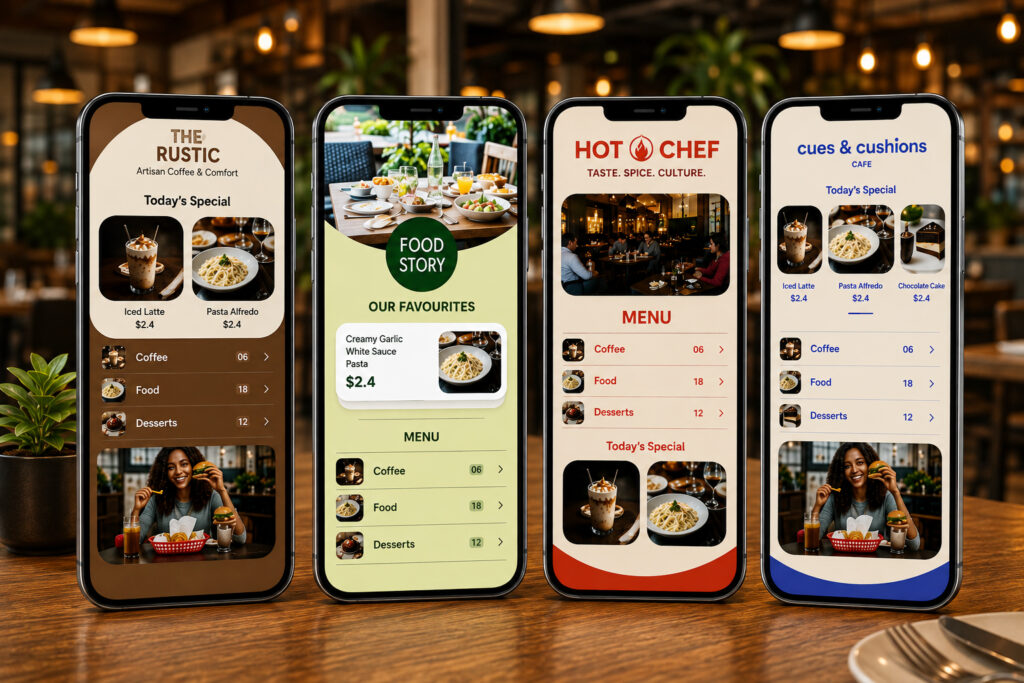
Restaurants
Full-service restaurants can use digital menus for food, drinks, specials, dietary information and seasonal sections.
Cafés
Cafés often change brunch items, baked goods, sizes and milk options. A digital menu makes those changes easier to manage.
MenuFly’s café menu tools are designed around options such as sizes, milk choices, brunch sections and items that sell out.
Bars
Bars have particularly dynamic menus.
Cocktails, beer, spirits, happy-hour prices and availability can change frequently.
Hotels
Hotels may have several menus across restaurants, bars, room service and events. A centralized menu system can help keep those outlets organized.
Cloud Kitchens
For cloud kitchens, the menu is part of the storefront because there may be no physical dining room.
Keeping the digital menu and online ordering experience current becomes particularly important.
Restaurant Menu on Google: Final Checklist
Before considering the job finished, check the following:
- Your Google Business Profile is claimed and verified
- Your restaurant category is accurate
- Your menu URL is correct
- Your important menu sections are added
- Dish names are accurate
- Descriptions are useful and current
- Prices are correct
- Menu photos are current
- Your website has a dedicated menu page
- Your menu page is mobile-friendly
- Your menu information is readable as text
- Your Google menu matches your website
- Your QR code opens the current menu
- Old menu sources have been checked
- You have a process for updating prices and dishes
- You monitor menu performance
Frequently Asked Questions
How do I add my restaurant menu to Google?
Open your Google Business Profile and use the menu tools to add menu sections and individual dishes with descriptions and prices. You can also add a menu URL and menu photos. Google documents these options for eligible food and drink businesses.
How do I get my restaurant menu on Google Maps?
Manage your menu through your Google Business Profile. Google says menu information can appear on your Business Profile on Google Search and Maps. You can add menu items, provide a menu URL, and manage menu photos.
Does adding a menu to Google improve restaurant SEO?
It can give Google and customers more useful information about your restaurant, but adding a menu does not guarantee a higher local ranking. Local visibility depends on broader factors. Treat your menu as part of your overall local-search presence rather than a ranking shortcut.
Should I use a PDF or a webpage for my restaurant menu?
Keep the PDF if you need it for printing or downloads, but a dedicated webpage is generally more flexible as your main online menu. It can be mobile-friendly, easier to update, and linked from your Google Business Profile.
Can Google read my restaurant menu from my website?
Google says it may transcribe menu data from your business website so that it can appear accurately on your Business Profile.
That makes it useful to publish your menu as readable web content rather than relying only on a menu image.
Can Google create my menu from a PDF?
Google currently documents an experimental AI feature that can generate detailed menu information from a menu photo or PDF. Restaurants should review the generated content for accuracy before publishing it.
How often should I update my Google restaurant menu?
Update it whenever your prices, dishes, availability, specials or menu structure changes. Google says menu changes may take 24–48 hours to appear on Search and Maps.
Can I use the same digital menu for Google and a QR code?
Yes. A restaurant can maintain one live menu URL and use it across multiple channels, including its website, Google Business Profile, QR codes and social media.
The important part is keeping that menu current.
Final Thoughts
Your restaurant menu should not exist in only one place.
A customer might discover your restaurant through Google Search, open it through Google Maps, scan a QR code at the table, visit your website from Instagram, or share your menu with someone on WhatsApp.
They should be seeing the same menu.
That means the goal isn’t simply:
“Get my menu on Google.”
The better goal is:
Create one accurate, mobile-friendly menu that can be discovered, shared, updated and used everywhere.
Google Business Profile gives restaurants tools to manage menu sections, dishes, descriptions, prices, menu URLs and menu photos.
Your own digital menu gives you more control over the complete customer experience.
And a platform like MenuFly can help connect the pieces — digital menu, QR code, print-ready menu and analytics — from one menu source.
If your restaurant menu is still sitting only inside a PDF or a printed folder, this is a good time to turn it into a live menu that customers can actually find and use online.
Leave a Reply