A restaurant’s menu is more than a list of dishes and prices. It is an important part of the dining experience.
Restaurants invest in beautiful interiors, attractive food presentations, seasonal decorations and memorable customer experiences. They carefully plan how their restaurant looks during Christmas, Valentine’s Day, Halloween and other special occasions.
But there is one important part of the customer experience that often stays the same: the menu.
Imagine walking into a beautifully decorated restaurant during Christmas. There are festive lights, a decorated tree and seasonal music. You scan the QR code on your table, but the digital menu looks exactly as it did six months ago.
Why shouldn’t the menu reflect the atmosphere of the restaurant?
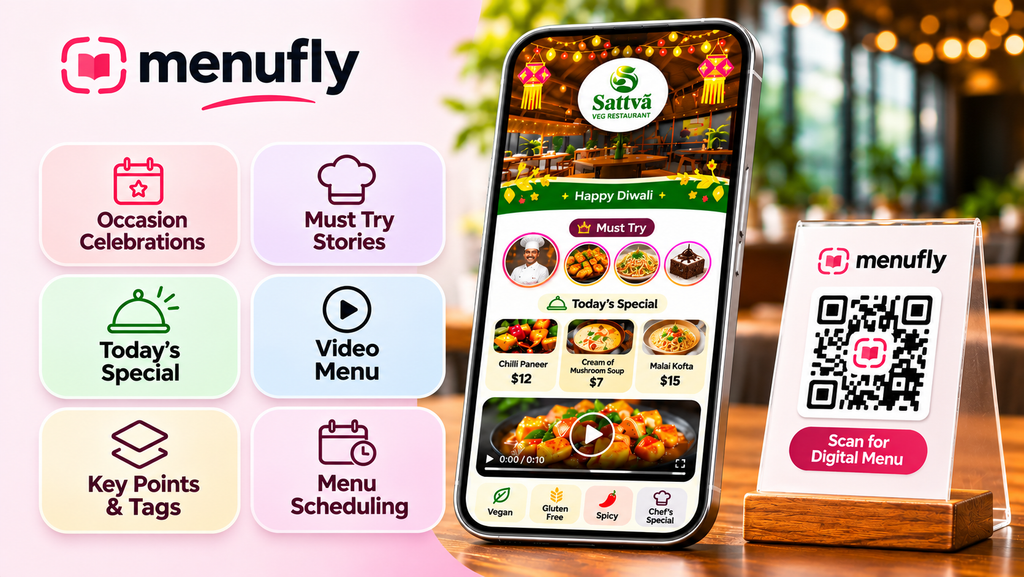
Today’s digital menus can do much more than display dish names and prices. They can highlight chef recommendations, showcase food videos, promote daily specials, display dietary information and automatically show relevant menu categories throughout the day.
The right features can make a digital menu more useful, informative and engaging for guests.
Here are seven digital menu features every restaurant owner should consider.
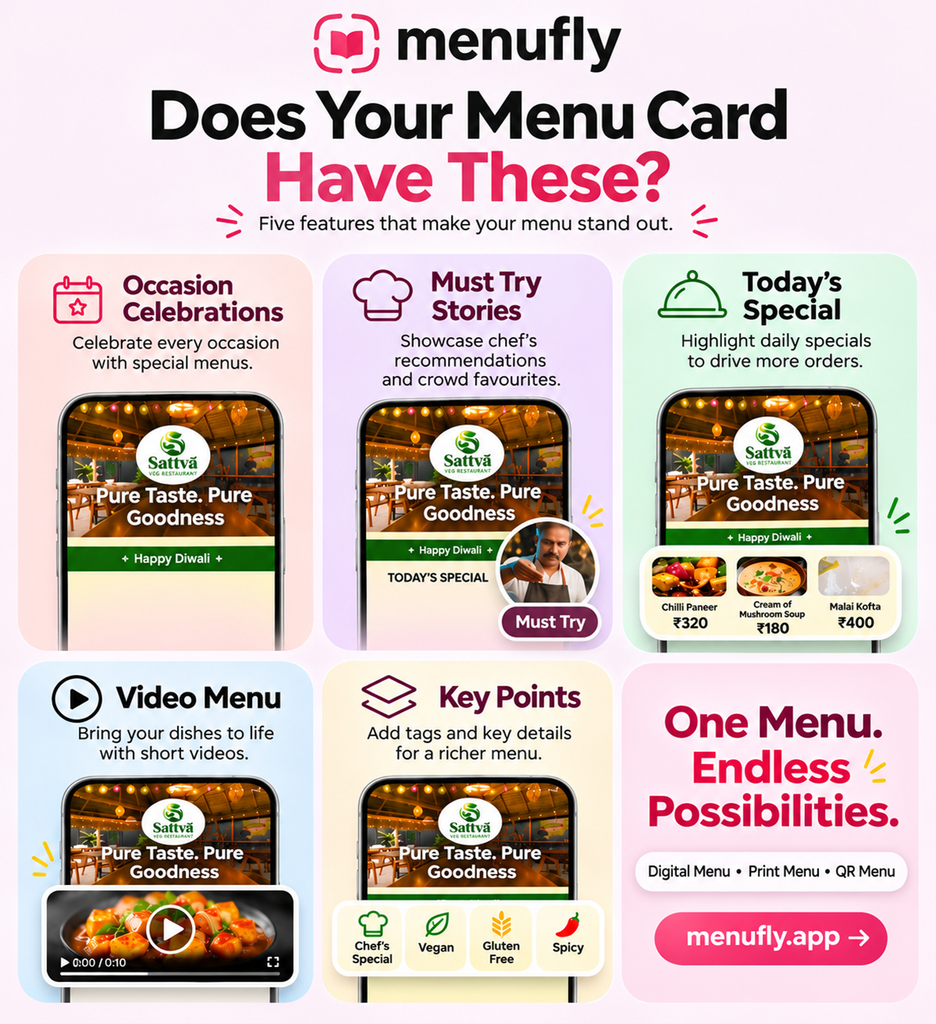
1. Make Your Digital Menu Match Every Occasion
Restaurants change their decorations to match festivals, holidays and special celebrations. Your digital menu can do the same.
Think about a restaurant celebrating Christmas. It might decorate its entrance with Christmas trees, lights and festive ornaments. When customers scan the QR code, the digital menu could welcome them with a matching seasonal design.
This creates a more connected experience between the restaurant’s physical environment and its digital menu.
Here are some occasions restaurants can celebrate through their digital menus:
- Christmas: Snowflakes, Christmas trees, ornaments and festive lights.
- Halloween: Pumpkins, autumn leaves and themed decorations.
- Valentine’s Day: Hearts, flowers and romantic design elements.
- New Year’s Eve: Confetti, sparkling effects and celebration decorations.
- Easter: Spring flowers, pastel colors and Easter-inspired elements.
- Diwali: Decorative lights, lanterns and festive patterns.
- Eid: Crescent moons, elegant lanterns and decorative details.
- Thanksgiving: Autumn leaves, warm colors and seasonal decorations.
- St. Patrick’s Day: Green accents and shamrock-inspired details.
Restaurants can use these visual touches to make their digital menus feel more relevant to the occasion.
Design tip: Keep decorations around the top and bottom of the menu. Avoid covering food images, prices, descriptions or navigation elements. The menu should remain easy to read on mobile screens.
With MenuFly, restaurants can add celebration effects to their digital menus and create a seasonal experience without redesigning the entire menu every time.
2. Highlight Chef Recommendations with Must-Try Stories
Have you ever asked a restaurant employee, “What would you recommend?”
Customers often want to know which dishes are popular, which ones are special and what the chef personally recommends.
A regular menu may contain dozens of dishes, but customers do not always know which ones they should try first.
A dedicated Must Try section can help restaurants highlight selected dishes with photographs, short videos and recommendations.
For example:
Chef’s Special Truffle Pasta – $18
“Our chef’s recommendation! Freshly prepared pasta tossed in a creamy truffle sauce with Parmesan and herbs.”
Other dishes a restaurant could highlight include:
- Signature Margherita Pizza
- House Special Burger
- Customer Favourite Chocolate Brownie
- Chef’s Special Ramen
- Signature Seafood Platter
- Weekend Brunch Special
You can also use short stories to explain what makes a particular dish special.
Instead of simply displaying a dish name, share the inspiration behind it, the ingredients that make it unique or why the chef recommends it.
Practical tip: Highlight a small selection of genuine recommendations. If every dish is labelled as a bestseller or chef’s special, customers may stop paying attention.
MenuFly’s Must Try story feature gives restaurants a way to bring selected dishes and recommendations into the digital menu experience.
3. Bring Today’s Specials Directly to Customers
Many restaurants display daily specials on a chalkboard, printed sign or board near the entrance.
But what happens when customers are already seated and browsing the menu on their phones?
They might never notice those specials.
A digital menu can bring featured dishes directly to the customer’s screen while they are deciding what to order.
For example:
Today’s Specials
| Dish | Price |
|---|---|
| Creamy Mushroom Soup | $8 |
| Grilled Chicken Sandwich | $14 |
| Signature Veggie Burger | $13 |
| Chocolate Lava Cake | $9 |
Restaurants can use this section to promote:
- Daily chef specials.
- Seasonal dishes.
- Limited-time desserts.
- New menu launches.
- Lunch and dinner offers.
- Weekend brunch options.
- Special beverage collections.
Daily specials are also useful for introducing dishes that restaurants want more customers to discover.
Practical tip: Keep your specials updated. Remove unavailable items, verify prices and make the offer period clear. A customer should never select a special only to discover that it is no longer available.
With MenuFly, restaurants can highlight Today’s Special inside their digital menus, helping customers discover featured dishes without looking for a separate board.
4. Use Food Videos to Bring Your Menu to Life
A photograph can show customers what a dish looks like. A short video can show them much more.
Think about:
- Cheese stretching from a freshly baked pizza.
- A burger being assembled with fresh ingredients.
- Chocolate sauce being poured over a dessert.
- A chef preparing a signature dish.
- A sizzling steak arriving at the table.
- A colourful mocktail being prepared.
These moments can communicate texture, preparation and presentation in ways that a dish name alone cannot.
Food videos can be especially useful for:
- Signature dishes.
- Premium menu items.
- Desserts and beverages.
- New menu launches.
- Dishes customers may not recognise by name.
You do not need a video for every item. Start with a few dishes that you most want customers to discover.
Practical tip: Keep videos short, clear and optimized for mobile devices. Make sure they load quickly and do not interrupt the browsing experience.
A digital menu with food videos gives restaurants another way to present their food and communicate what makes their dishes special.
5. Help Customers Choose with Smart Food Tags
Customers have different preferences and dietary requirements.
Some look for vegetarian options. Others want vegan dishes, gluten-free choices or food with a particular spice level. Some customers want to find the chef’s recommendations or popular dishes quickly.
Smart food tags make it easier to identify these options while browsing.
Here are some useful examples:
| Tag | Purpose |
|---|---|
| Vegetarian | Identifies vegetarian dishes |
| Vegan | Identifies dishes made without animal-derived ingredients |
| Gluten-Free | Identifies dishes verified as gluten-free |
| Dairy-Free | Highlights dishes without dairy ingredients |
| Spicy | Indicates a spicy flavour profile |
| Chef’s Special | Highlights chef-recommended dishes |
| Bestseller | Identifies popular customer choices |
| New Arrival | Highlights recently added dishes |
| Contains Nuts | Communicates relevant allergen information |
Restaurants can also provide detailed dish descriptions and allergen information to help customers make informed choices.
For example:
Vegan Buddha Bowl – $15
“Fresh seasonal vegetables, quinoa, avocado and house-made lemon dressing.”
This tells customers more than simply displaying the dish name.
Practical tip: Verify ingredients and preparation methods before applying dietary or allergen labels. A dish should not be labelled gluten-free or allergen-safe without appropriate checks, including cross-contact considerations.
MenuFly supports food tags, allergen information and dish descriptions, helping restaurants communicate important menu details more clearly.
6. Show the Right Menu at the Right Time
Not every restaurant serves the same dishes throughout the day.
A café might offer breakfast until late morning, lunch in the afternoon and snacks in the evening. A hotel restaurant might have separate breakfast, lunch, dinner and late-night menus.
If every category remains visible all day, customers may see dishes that are not currently available.
Time-based menu scheduling helps solve this problem.
For example:
| Menu Category | Available Time |
|---|---|
| Breakfast | 7:00 AM – 11:00 AM |
| Lunch | 12:00 PM – 3:30 PM |
| Afternoon Snacks | 3:30 PM – 6:00 PM |
| Dinner | 6:30 PM – 10:30 PM |
These are sample timings. Each restaurant can configure its own operating hours.
This feature is particularly useful for:
- Hotels with multiple dining periods.
- Cafés serving breakfast and evening snacks.
- Restaurants with separate lunch and dinner menus.
- Bars offering happy-hour menus.
- Bakeries with different morning and evening selections.
Practical tip: Plan your schedules around actual service hours and remember to update them when opening hours change.
With MenuFly, restaurants can schedule menu categories so customers see relevant food options at the appropriate time.
7. Write Better Dish Descriptions and Give Customers More Information
A dish name and price do not always tell customers everything they want to know.
Compare these two menu entries:
Basic menu entry
Chicken Alfredo Pasta – $16
More informative menu entry
Chicken Alfredo Pasta – $16
“Grilled chicken breast and fettuccine tossed in a creamy Parmesan Alfredo sauce, finished with fresh herbs.”
The second description gives customers a better idea of what they can expect.
Useful dish descriptions can include:
- Main ingredients.
- Cooking and preparation methods.
- Portion or serving details.
- Spice level.
- Special ingredients.
- Dietary information.
- Allergen details.
You can also use short and detailed descriptions for different browsing needs.
A short description helps customers scan the menu quickly, while a detailed description gives them more information when they want it.
For restaurants serving international customers, multilingual menu content can also make the experience easier for guests who are more comfortable reading another language.
Practical tip: Keep descriptions clear, accurate and easy to understand. Avoid long promotional paragraphs that make the menu difficult to browse.
A well-written description can answer common questions and help customers make confident choices.
Why Small Digital Menu Features Matter
A digital menu should do more than replace a printed menu with a QR code.
It should help customers discover dishes, understand their options and find relevant information without unnecessary effort.
Thoughtful digital menu features can help restaurants:
Improve the browsing experience
Food photographs, videos and clear descriptions help customers explore dishes more easily.
Give important dishes more visibility
Chef recommendations, bestsellers and daily specials help customers discover selected items.
Communicate dietary information
Food tags and allergen details help customers understand menu options.
Keep the menu relevant
Seasonal decorations and scheduled categories help the menu reflect the restaurant’s current offerings and atmosphere.
Reduce repeated questions
Clear descriptions and accurate information can answer common customer questions before customers need to ask staff.
The best approach is to start with features that solve real problems for your customers. You do not need to activate everything at once.
How MenuFly Helps Restaurants Create More Useful Digital Menus
MenuFly helps restaurants create and manage digital menus with tools designed for both customer experience and everyday menu management.
With MenuFly, restaurants can:
- Create a mobile-friendly digital menu accessible through a QR code.
- Choose from professionally designed menu templates.
- Add food photographs and videos.
- Highlight chef recommendations with Must Try stories.
- Promote daily specials.
- Add food tags and allergen information.
- Schedule menu categories based on serving times.
- Add celebration effects for festivals and special occasions.
- Create print-ready menu PDFs alongside their digital menu.
Instead of managing separate menu experiences, restaurants can manage their digital and print menu content through one platform.
Whether you operate a café, restaurant, hotel, bakery or bar, MenuFly gives you tools to make your menu more than a simple list of dishes.
Ready to create a more engaging menu for your restaurant?
Explore MenuFly and start building your digital menu.
Create Your Digital Menu with MenuFly
Explore more:
Frequently Asked Questions
1. What features should a good digital menu have?
A good digital menu should include clear dish names, prices, descriptions, food photographs, easy navigation and mobile-friendly design. Additional useful features include QR code access, food videos, dietary tags, allergen information, daily specials and category scheduling.
2. How can I make my restaurant QR code menu more attractive?
Use a clean layout, high-quality food photographs, readable typography and well-organized categories. You can also add chef recommendations, daily specials, food videos and seasonal decorations to make the experience more engaging.
3. Can I show different menus for breakfast, lunch and dinner?
Yes. A digital menu platform with category scheduling can display different menu categories during selected time periods. For example, breakfast can appear in the morning, while dinner categories become available later in the day.
4. Why should restaurants add videos to their digital menus?
Videos help customers understand the appearance, texture and presentation of dishes. They can be particularly useful for signature dishes, desserts, beverages and food items that customers may not recognize by name alone.
5. How can restaurants highlight chef-recommended dishes?
Create a dedicated Must Try or Chef’s Special section. Include a good food photograph, a short description and a genuine recommendation from the chef. This helps customers discover dishes the restaurant wants to showcase.
6. Can I update daily specials on a QR code menu?
Yes. With a digital menu management platform, restaurants can update featured dishes, prices and descriptions without reprinting physical menus. Customers scanning the restaurant’s QR code can access the updated menu.
7. Can a digital menu also be used for printing?
Yes. Some digital menu platforms support print-ready PDF exports. This allows restaurants to manage menu content in one place and prepare versions for both mobile screens and physical printing.
8. Are digital menus suitable for cafés, bars and hotels?
Yes. Digital menus can work for many hospitality businesses, including cafés, bars, hotels, bakeries, food trucks and full-service restaurants. The most useful features depend on the business’s menu structure and service style.
Final Thoughts
Your restaurant’s menu is part of the dining experience.
It can welcome customers, introduce signature dishes, highlight daily specials and help people make confident choices.
A few thoughtful improvements can make a big difference. Start by making your menu more informative, relevant and easier to explore.
One menu. Endless possibilities.
