Last checked: November 2026. Disclosure: we build MenuFly, one of the tools in this list. We tested every tool the same way and list MenuFly’s limits as plainly as everyone else’s.
A “free” digital menu maker can mean three very different things. Some tools stay free forever with limits. Some give you a 14-day trial and then ask for a card. Some are design tools that make a nice image but not a real menu that guests can open by QR code.
We compared seven popular tools on what you actually get for ₹0 / $0. Here is the short answer:
- Best for digital + print from one menu: MenuFly
- Best for one-off printed designs: Canva
- Best free plan with QR ordering: MENU TIGER
- Best for a simple menu + link-in-bio page: Menubly
- Best for large free item limits: FlyMenu
- Best for US multi-location groups (paid): MustHaveMenus
- Best for tablet menus in hotels (paid): FineDine
If you only need one thing, jump to the comparison table. If you run a restaurant, cafe or cloud kitchen and need both a QR menu and printed menus, read the MenuFly and Canva sections first.
Free digital menu makers compared (2026)
| Tool | Free option | Live QR menu | Print-ready PDF from same menu | Food video | Today’s special / offers | Paid from |
|---|---|---|---|---|---|---|
| MenuFly | Free account, no card; try without sign-up | Yes | Yes, same menu | Yes | Yes, plus Must Try stories | $5/Month |
| Canva | Free forever | No (QR links to a design) | Yes, as a design | No | Manual design only | ~$15/month (Pro) |
| MENU TIGER | Free forever: 1 store, 10 tables, 7 categories | Yes, with ordering | No | No | 1 active promo | $17/month |
| Menubly | Free: mini website + links | Paid plan | No | No | Limited | $7.99/month |
| FlyMenu | Free forever: up to 100 dishes per menu | Yes | No | No | Limited | €39.90/month |
| MustHaveMenus | Free trial only | Pro plan | Yes | Pro plan | Highlights | $24/month (Design) |
| FineDine | Free trial | Yes | No | Yes | Yes | ~$24/month |
Prices are in USD unless stated and were checked on each vendor’s site or a major review site in November 2026. Free plans change, so confirm before you sign up.
How we compared them
We built the same 40-item cafe menu in each tool and checked six things a restaurant owner actually cares about:
- What is free, and for how long. A free-forever plan is not the same as a 14-day trial.
- A real QR menu, not a picture. Guests should open a mobile web menu that updates when you change a price, without reprinting the QR code.
- Print from the same menu. Most restaurants still need table menus, takeaway menus or leather folders. Retyping the menu in a second tool doubles the work and causes price mismatches.
- Visual selling tools. Food photos, short videos, today’s specials and offer banners help guests discover dishes.
- Editing speed. How long a price change or a new dish takes, on a phone and on a laptop.
- Fit for Indian restaurants. Rupee pricing, veg/non-veg and Jain marks, thalis and half/full portions.
The 7 best free digital menu makers, reviewed
1. MenuFly: best for one menu that works as a QR menu and a printed menu
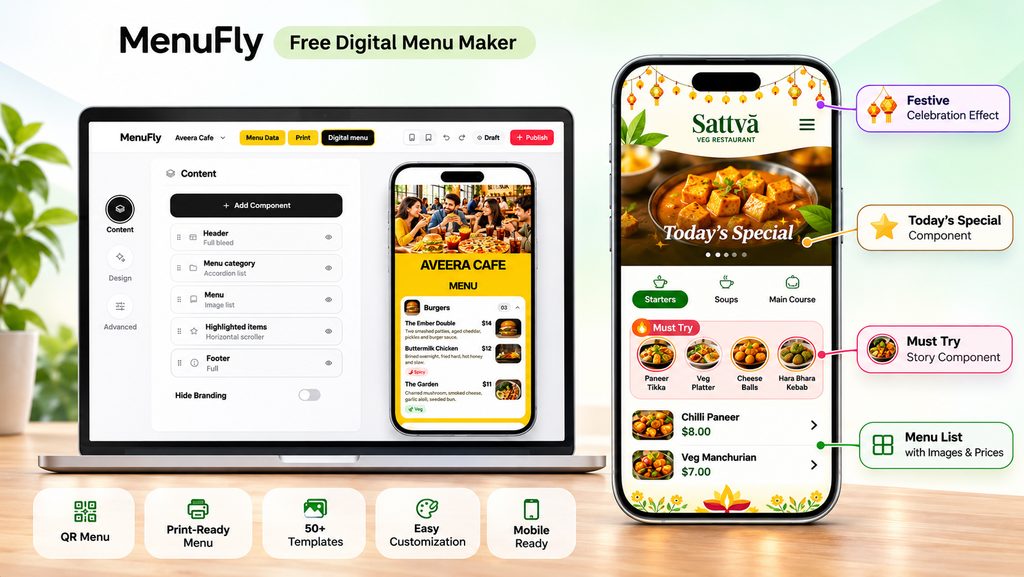
MenuFly is a free digital menu maker built by a team that has designed and printed more than 2,000 restaurant menus. Its main idea is simple: you enter your menu once and get two outputs: a mobile digital menu guests open by QR code, and a print-ready PDF for table menus. Both stay linked, so when you edit a dish or a price, you can update either one at any time without retyping.
You can try the menu maker without signing up. It opens a sample menu in your browser, and you create a free account (no card) only when you want to keep it.
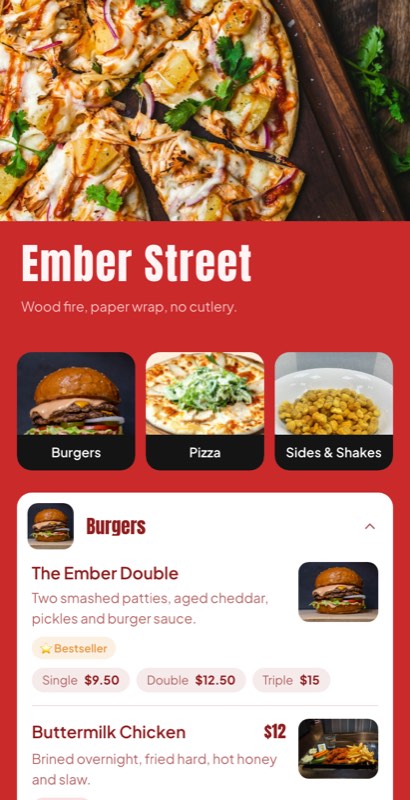
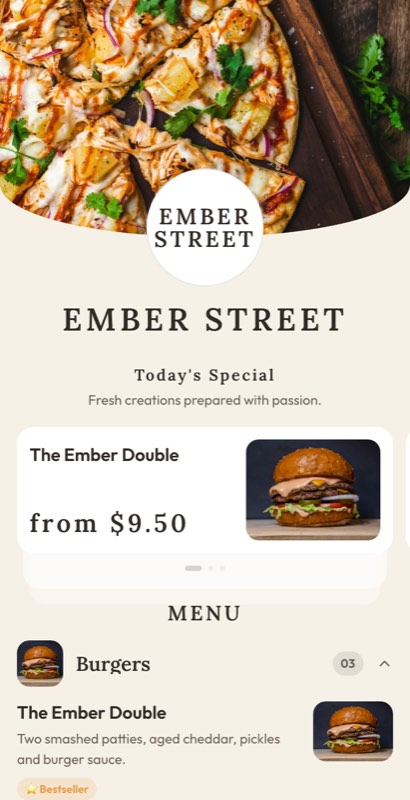
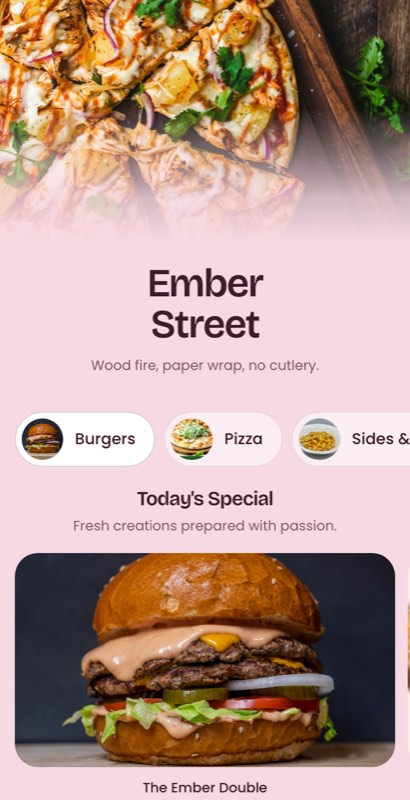
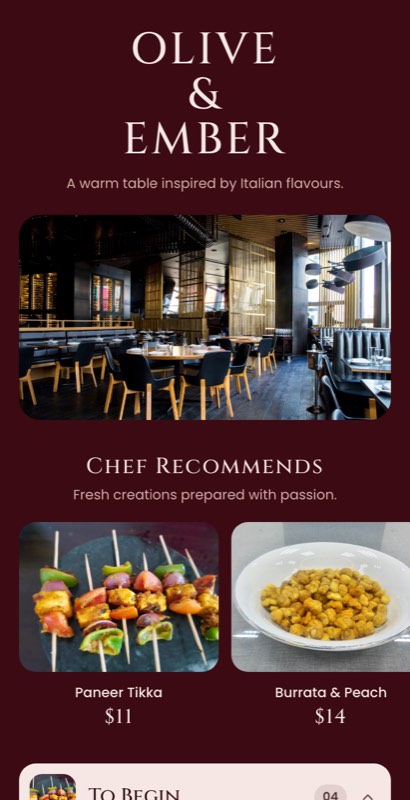
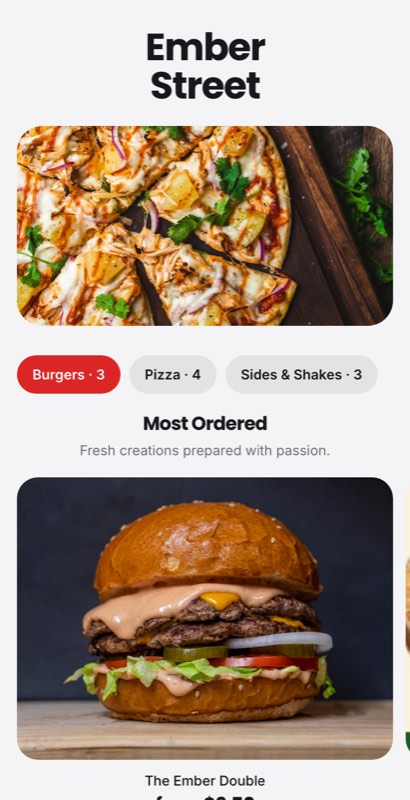
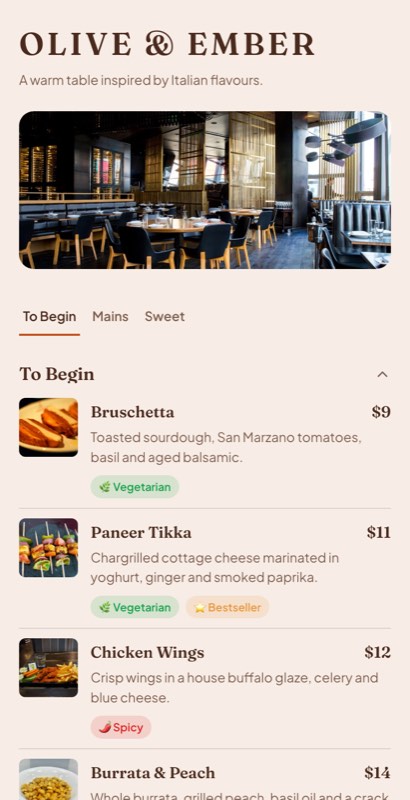
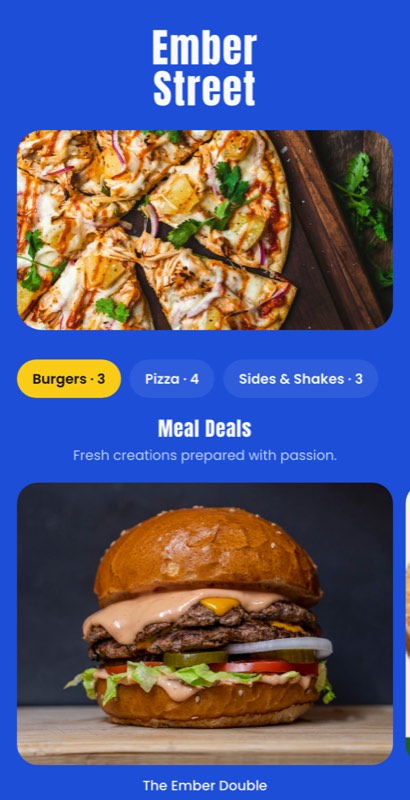
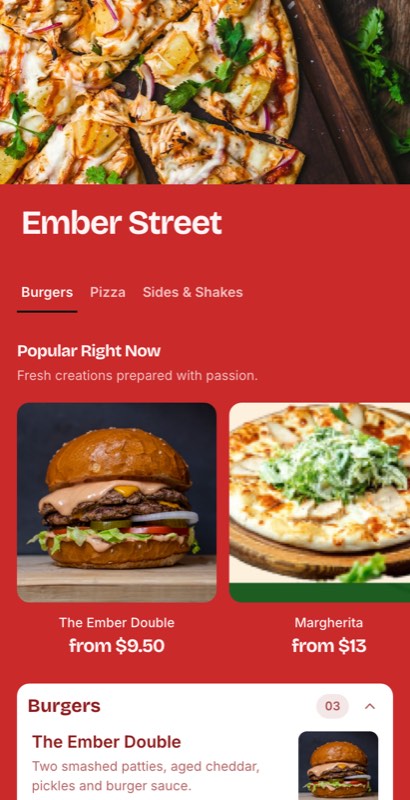
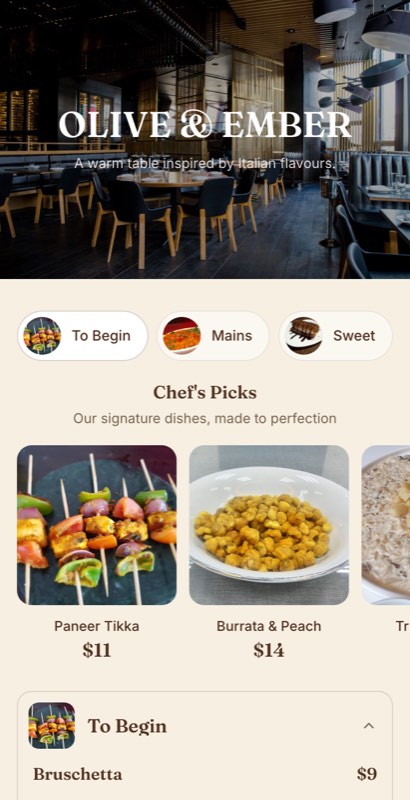
What stands out in the digital menu:
- Must Try stories: a story-style highlight for chef’s picks and crowd favourites. You fully customize it with your own video or images, so it also works for promotions.
- Food videos: add short clips of signature dishes, like a sizzler arriving or cheese stretching on a pizza.
- Today’s Special: featured dishes appear at the top of the menu, instead of on a whiteboard guests walk past.
- Offer highlights and occasion menus: run a lunch combo, a happy hour or a Diwali or Christmas menu as its own section.
- Reviews link: send happy guests straight to your Google review page from the menu.
- Image library: pick ready food and design images if you don’t have photos yet.
- Tags and key points: chef’s special, vegan, gluten free, spicy, plus veg/non-veg and Jain marks for Indian menus.
- Menu scheduling: breakfast, lunch, dinner and happy hour menus that switch by time.
Print side: print-ready templates in A4, 5.2 × 11 in and 8 × 8 in, exported as a PDF for your printer.

Free plan: Menus 1 Menu, menu items50, PDF variationsi 2
Pros
- Digital and print menus from the same data, so prices never mismatch
- Video, Must Try stories and specials are built for selling, not just listing
- Templates made for Indian restaurants, cafes, bars and cloud kitchens
- Try before sign-up
Cons
- Newer brand, with fewer third-party reviews than Canva or MENU TIGER
- MenuFly: no built-in online ordering or POS sync (this will come soon)
Best for: restaurants and cafes that want a QR menu and printed menus without paying a designer every time the menu changes.
2. Canva: best for one-off printed menu designs
Canva is a general design tool with a large library of menu templates, and its free plan is a real product, not a trial. It is excellent for a printed menu, poster or Instagram post.
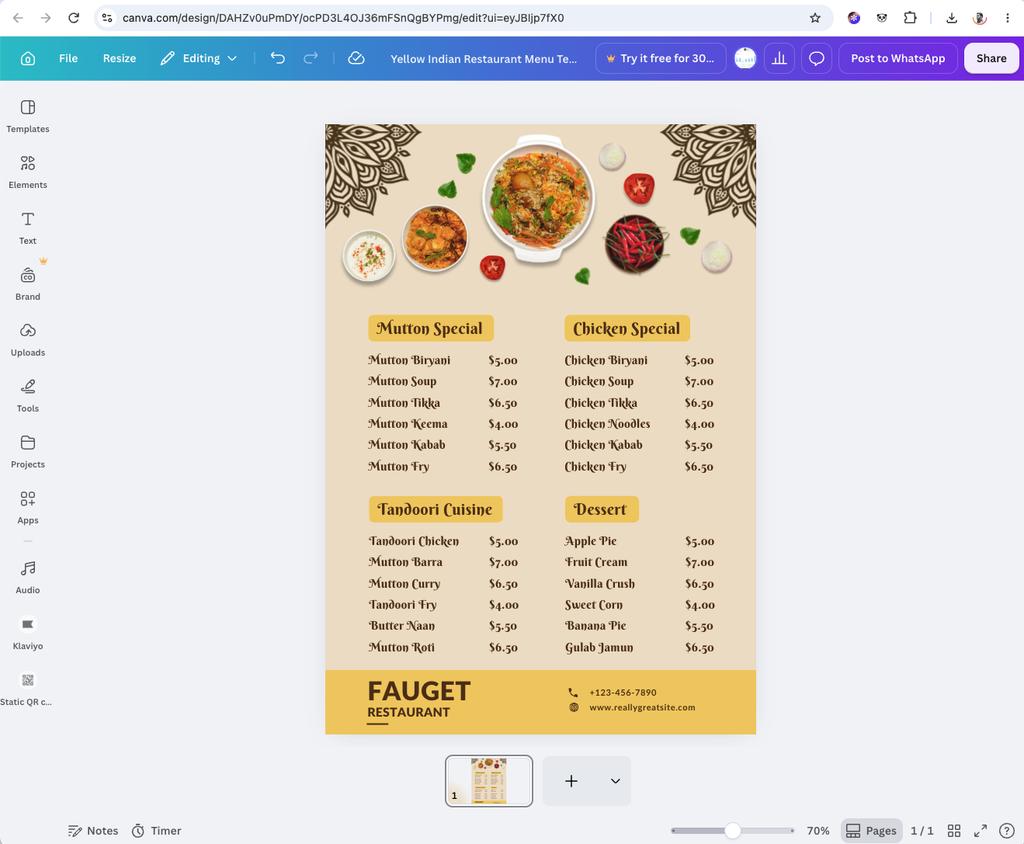
The limit is that a Canva menu is a design, not a live menu. You can add a QR code, but it points to a file or page that you must re-export and re-share after every price change. There are no menu items, prices or categories as data, so the print menu and any digital version are two separate files.
- Free: yes, forever; many templates are Pro-only
- Paid: Canva Pro, about $15/month (varies by country)
- Best for: a one-time printed menu or social posts, if you don’t change prices often
3. MENU TIGER: best free plan for QR ordering
MENU TIGER focuses on QR ordering, not menu design. Its own site says the Freemium plan covers one store, QR menus for up to 10 tables, seven categories with seven items each, QR ordering, one active promotion, multi-language menus and feedback forms.
- Free: yes, forever, with tight item limits
- Paid: Regular $17/month, Advanced $46/month, Premium $119/month
- No print-ready menu from the same data
- Best for: a small cafe that wants guests to order from the table
4. Menubly: best for a menu plus a link-in-bio page
Menubly combines an online menu with a mini website. Review sites list the free plan as a mini website with unlimited links. The built-in online menu, QR code menu, ordering and full customization come with Pro at $7.99/month.
- Free: mini website only; the QR menu is on Pro
- Best for: food businesses that sell mainly through Instagram
5. FlyMenu: best for a large free item limit
FlyMenu keeps every venue on a free plan, with Premium features switched on for the first 21 days. The free plan allows up to 100 dishes per menu, which is generous. It focuses on the digital menu, with allergens and multiple languages, and has no print workflow.
- Free: yes, forever
- Paid: Premium €39.90/month
- Best for: European restaurants that need multi-language menus
6. MustHaveMenus: best for US multi-location groups (paid)
MustHaveMenus was a popular free option, but in 2026 its pricing page lists only paid plans. Design is $24/month billed annually, and Pro is $50 per location per month. Pro adds mobile menus, Toast and Square POS sync and video. New users get a free trial.
- Free: trial only
- Best for: US groups that print heavily and use Toast or Square
- See our full MenuFly vs MustHaveMenus comparison
7. FineDine: best for tablet menus in hotels (paid)
FineDine offers QR, tablet and kiosk menus with photos, video and multi-language support. You can test it free, but ongoing use needs a paid plan, from about $24/month.
- Free: trial
- Best for: hotels and premium restaurants that want tablet menus at the table
Which free digital menu maker should you choose?
| Your situation | Pick | Why |
|---|---|---|
| You need a QR menu and printed table menus | MenuFly | One menu, two outputs; edit both any time |
| You change prices or specials every week | MenuFly or FlyMenu | Live QR menu, no reprinting |
| You want to sell more with photos, video and specials | MenuFly or FineDine | Video, Must Try stories, Today’s Special |
| You want guests to order and pay from the table | MENU TIGER | Free plan includes QR ordering |
| You sell mostly through Instagram | Menubly | Menu plus link-in-bio page |
| You only need one printed menu this year | Canva | Free design tool, huge template library |
| You run 10+ US locations on Toast or Square | MustHaveMenus | POS sync and multi-location tools |
For Indian restaurants, cafes and cloud kitchens: look for rupee pricing, half/full portions, veg/non-veg and Jain marks, and a print size your local printer accepts. MenuFly has Indian restaurant menu templates built around thalis, tandoor sections and spice levels.
FAQ
What is the best free digital menu maker?
It depends on what you need. MenuFly is the best choice for one menu that works as both a QR menu and a printed menu. MENU TIGER’s free plan is best for QR ordering. Canva is best for a one-off printed design.
Can I create a digital menu for free?
Yes. MenuFly, MENU TIGER and FlyMenu all let you publish a working QR menu on a free plan. Check the item, table and scan limits before you print QR codes.
Is a Canva menu a digital menu?
Not really. Canva makes a designed image or PDF. You can link a QR code to it, but you must re-export and re-share the file after every change. A digital menu maker stores your dishes and prices as data and updates the live menu instantly.
Can I print my digital menu?
With MenuFly, yes: the same menu exports as a print-ready PDF in A4, 5.2 × 11 in or 8 × 8 in. Most QR-only tools, like MENU TIGER and FlyMenu, don’t create print layouts.
Can I add videos to a digital menu?
Yes, in MenuFly and FineDine. MenuFly also lets you add videos and images to Must Try stories for chef’s picks and promotions.
Do guests need an app to open a QR menu?
No. A web-based digital menu opens in the phone’s browser after a scan.
Does a QR code menu stop working if I change my menu?
Not with a dynamic QR menu. The QR code points to a live page, so your edits appear without reprinting the code.
Conclusion
Most free menu tools make you choose between a nice printed design and a live QR menu. If you want both from one menu, plus video, Must Try stories, today’s specials, offers and a reviews link, start with MenuFly. If you only need QR ordering, MENU TIGER’s free plan is a solid start. For a single printed design, Canva is enough.