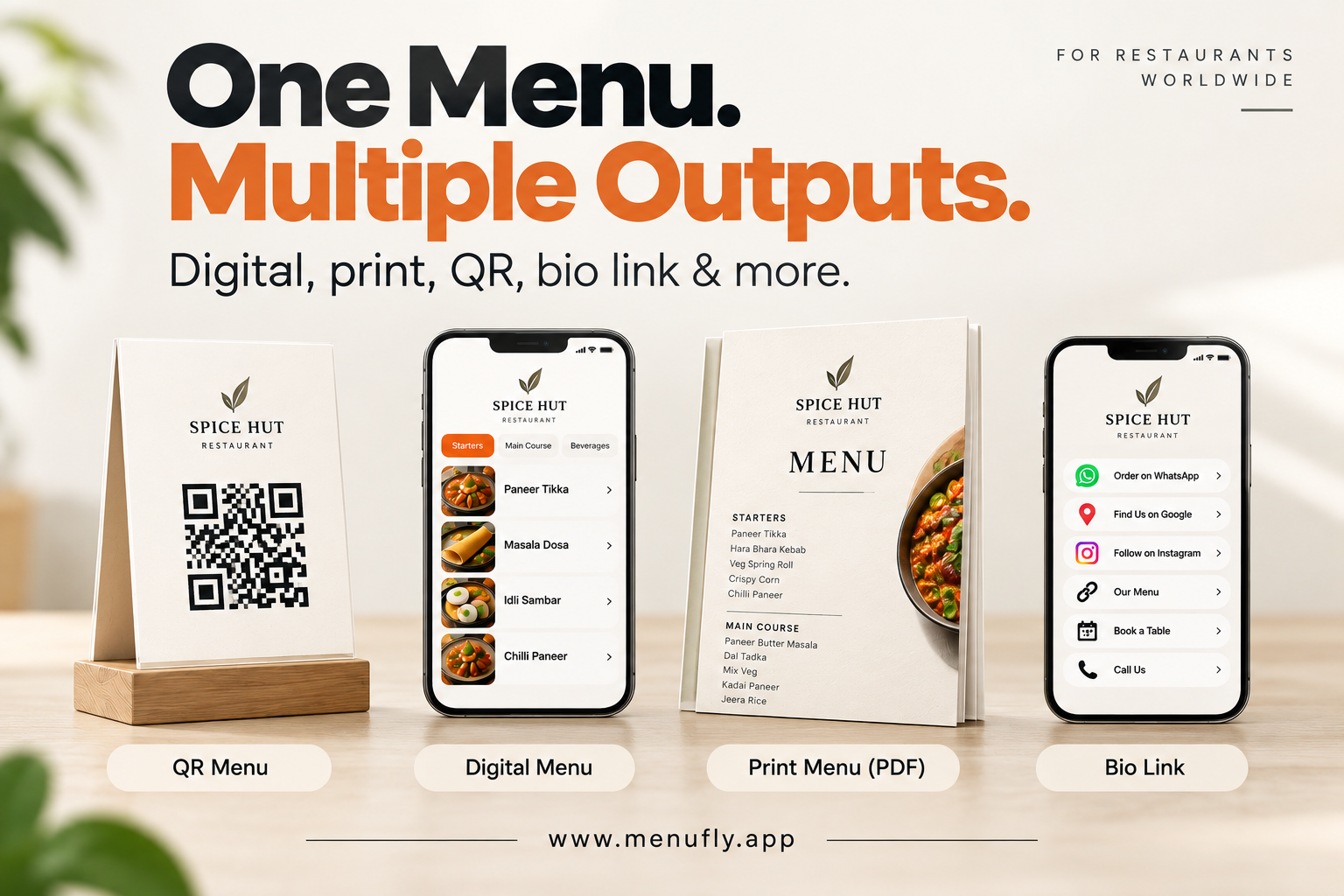
A restaurant doesn’t really have just one menu anymore.
The same dishes, prices and categories may need to appear on a printed menu at the table, a QR code menu on a customer’s phone, a link shared on WhatsApp, your Google Business Profile, your Instagram bio and a PDF sent to a printer.
The problem is that many restaurants manage each of these separately.
There is one file with the designer. Another PDF sits on someone’s laptop. The QR code points to an older version. WhatsApp has another copy. The printed menu still shows last month’s prices.
Then one dish changes from $12 to $14.
Suddenly, a two-dollar price change becomes five separate jobs.
After more than 15 years working with restaurant menu design, printing and visual branding, we’ve seen this problem repeatedly. It is also one of the reasons we built MenuFly: your menu data should exist once, while the menu itself can appear in many formats.
That is the idea behind:
One menu. Multiple outputs.
What Does “One Menu, Multiple Outputs” Actually Mean?
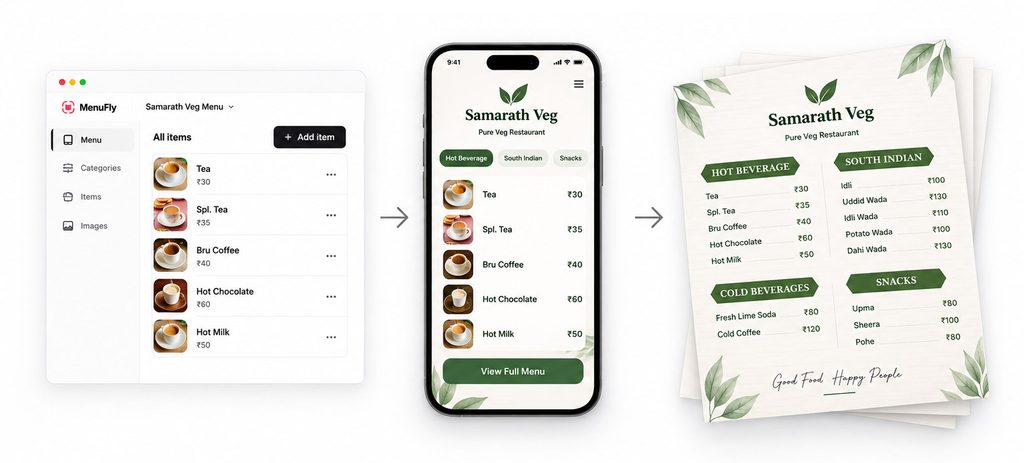
Think of your restaurant’s menu as data first and design second.
Your core menu contains:
- Categories
- Dish names
- Descriptions
- Prices
- Photos
- Dietary information
- Variants and add-ons
- Availability
Instead of recreating that information every time you need another format, you maintain one master menu.
That master menu can then power:
Digital Menu → QR Menu → Print PDF → Bio Link → WhatsApp → Google → Instagram
The information stays centralized. The way customers access it changes.
MenuFly currently takes this approach with digital menus, QR access and print-ready PDF generation: dishes, prices, photos and categories are managed centrally, while digital and print versions are generated from that menu data.
That sounds like a small workflow change. Operationally, it can solve a surprisingly large menu-management problem.
The Traditional Way of Managing Restaurant Menus
Imagine a restaurant with 80 dishes.
The restaurant initially pays a designer to create a printed menu.
A few months later:
The chef adds three dishes.
The design file needs updating.
Five prices change.
The designer updates them again.
The owner wants a QR menu.
Someone exports a PDF, uploads it somewhere and creates a QR code.
The restaurant wants its menu on Instagram.
Another link or file is created.
The printer needs a new menu.
Another PDF is exported and sent.
None of these steps is particularly difficult.
The difficulty is keeping all of them correct at the same time.
This is where restaurant owners often lose money—not necessarily because design or printing is too expensive, but because they repeatedly pay for small corrections, reprints and duplicated work.
A Better Model: Create Once, Use Everywhere
A more practical menu workflow looks like this:
Create → Manage → Publish → Print → Share
You enter the dish information once.
Then different outputs use the same source.
1. Digital Menu
A digital restaurant menu should be designed specifically for a phone.
That distinction matters.
We’ve seen plenty of restaurants describe a PDF opened on a phone as a “digital menu.” Technically it is digital, but the customer experience is usually poor.
Guests may have to:
- pinch to zoom;
- move horizontally around an A4 page;
- search through tiny text;
- wait for a large PDF to load;
- repeatedly zoom in to read prices.
A proper digital menu restructures the information for a small screen.
Categories should be easy to navigate. Dish names and prices should be readable without zooming. Photos should be appropriately sized. Important information should have a clear hierarchy.
MenuFly’s digital menu is browser-based and designed around mobile navigation rather than simply displaying a print PDF on a phone.
Practical tip: Before publishing any digital menu, open it on an average-sized phone and try to find three specific dishes. If that feels slow or frustrating, your customers will experience the same problem.
2. QR Code Menu
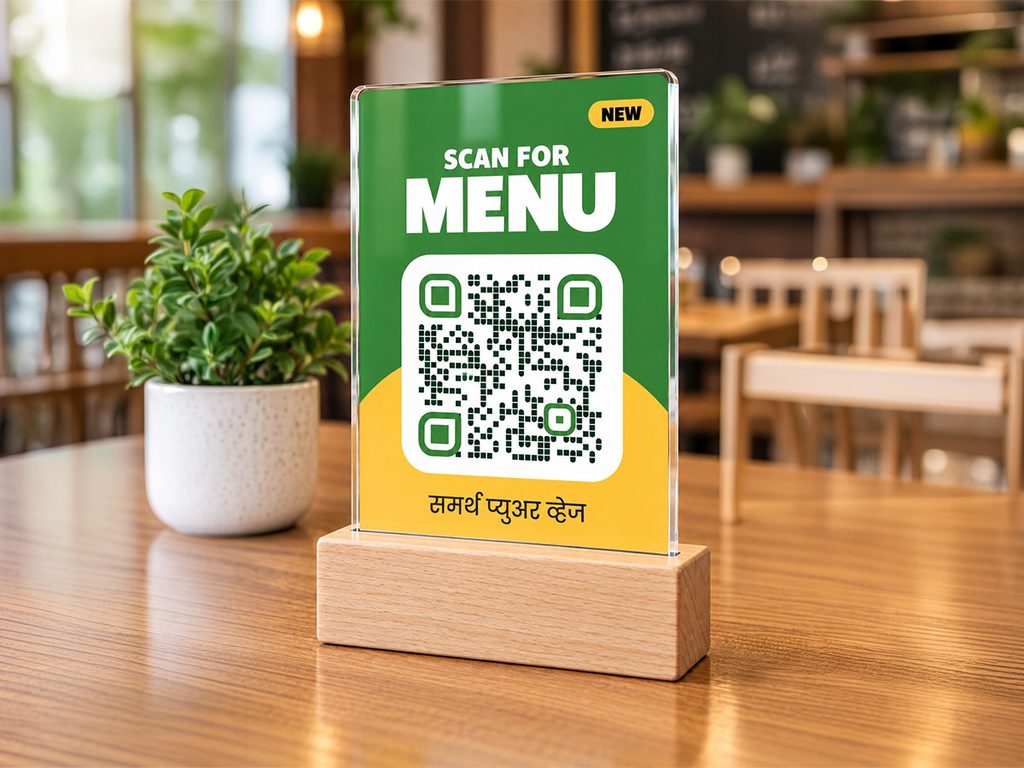
A QR menu is not really another menu.
The QR code is simply the doorway to your digital menu.
A customer scans the code with their phone, and the linked menu opens in their browser. Because the code points to a URL rather than storing your actual dishes and prices, the destination can stay current as the menu changes.
This creates an important operational advantage.
Suppose you print 30 QR table stands.
Two weeks later, you change the price of your pasta.
You should not need 30 new QR stands.
The QR remains the same. You update the menu behind it.
A common QR menu mistake
Don’t create a new QR code every time you update your menu.
We’ve seen restaurants repeatedly print QR stickers because the QR code was tied to a temporary PDF or changing file URL.
Instead:
QR code → permanent menu URL → current digital menu
Then the physical QR code can remain on the table while the content behind it changes.
MenuFly follows this model: menu updates can be reflected in the digital destination without requiring restaurants to replace the printed QR code.
3. Print-Ready Menu PDF
Digital menus haven’t made printed menus unnecessary.
And we don’t recommend treating print and digital as an either/or decision.
A printed menu is still an important part of the dining experience for many restaurants, cafés, bars and hotels. A well-designed physical menu can reinforce the restaurant’s positioning in a way a phone screen cannot.
The problem is maintaining a separate print design every time the menu changes.
Instead, the same master menu can generate a print-ready PDF.
For example:
Master menu
↓
Digital menu: optimized for phones
↓
Print PDF: optimized for paper
Same dishes. Same prices.
Different presentation.
MenuFly supports print-ready outputs including A4, A5 and booklet formats, with print-oriented features such as high-resolution images, bleed and crop marks.
What we’ve learned from 15+ years of printing menus
One of the most expensive menu mistakes happens before printing starts.
A restaurant approves 20, 30 or 50 copies, sends the artwork for production and then discovers:
- one price is wrong;
- an old dish is still included;
- a phone number has changed;
- the spelling of an item is incorrect;
- one category was accidentally omitted.
The printing itself may be perfect.
But the information is wrong.
Now the restaurant either lives with the mistake or pays for another print run.
Centralizing the menu doesn’t eliminate the need for proofreading, but it reduces the number of independent files that need to be checked.
Before printing, verify the data—not just the design.
4. Bio Link
Your restaurant’s menu doesn’t only live inside the restaurant.
A potential customer might discover you on Instagram before ever walking through the door.
They may want to:
View Menu
Find Us on Google
Order on WhatsApp
Call Restaurant
Book a Table
Get Directions
This is where a restaurant bio link becomes useful.
Instead of putting one isolated menu URL in your Instagram bio, the link can become a small landing page connecting customers to the restaurant’s most important actions.
For example:
View Menu
Order on WhatsApp
Find Us on Google
Follow on Instagram
Book a Table
Call Us
The important principle remains the same:
Don’t create another menu to maintain. Link back to the menu you already manage.
5. WhatsApp Menu Link
WhatsApp is often one of the quickest ways for a restaurant to share its menu directly with a customer.
The usual approach is to send a PDF.
That works—until the PDF becomes outdated.
Imagine that a customer saved your menu three months ago.
They open it today and see an old price.
A live menu link avoids that problem because the customer opens the current published version instead of an old attachment.
A useful rule is:
Use PDFs for printing. Use links for sharing.
There will be exceptions, but this simple distinction prevents a lot of version-control problems.
6. Google and Social Media
Customers searching for a restaurant often want the menu before anything else.
Where possible, give them a route to the same live menu you already maintain rather than creating another manually maintained menu page.
The same principle applies to:
Google Business Profile
Instagram
Facebook
WhatsApp
Restaurant website
QR codes
Email campaigns
SMS
Hotel guest information
Takeaway packaging
You don’t need a different menu for every channel.
You need one reliable menu URL that can travel across channels.
Digital vs Print vs QR: Which Menu Does a Restaurant Need?
For many restaurants, the answer isn’t one or the other.
| Format | Best use | Main advantage | Main limitation |
|---|---|---|---|
| Printed menu | Table service | Physical brand experience | Requires reprinting when content changes |
| Digital menu | Mobile browsing | Easy to update | Requires a phone/internet connection |
| QR menu | Tables, counters, packaging | Fast access to digital menu | QR placement and scanning experience matter |
| Print PDF | Professional printing | Printer-ready output | Static after export |
| Bio link | Instagram/social traffic | Multiple actions in one place | Must be kept organized |
| WhatsApp link | Direct customer sharing | Easy to send | Needs a reliable destination |
The strongest setup is often hybrid.
Printed menus can provide the physical experience customers expect, while a digital/QR menu handles frequently changing information. Industry guidance similarly notes that print can remain valuable in settings where the physical menu is part of the experience, while digital formats offer greater flexibility for updates.
The Hidden Cost Isn’t Printing. It’s Reprinting.
Restaurant owners naturally compare the price of a digital menu platform with the price of printing.
But that isn’t always the most useful comparison.
Consider a hypothetical restaurant with 25 printed menus.
Suppose designing and printing the initial batch costs $400.
Six months later, prices change.
Updating the artwork and printing another batch costs $250.
Three months later, drinks change.
Another update costs $150.
The restaurant has now spent:
Initial menus: $400
First update: $250
Second update: $150
Total: $800
The exact cost will vary enormously by country, materials, quantity, page count and printer. The point isn’t that printing costs $800.
The point is that menu maintenance has a cost.
When comparing systems, calculate:
Annual menu cost = design + printing + corrections + reprints + staff time + duplicated work
That gives you a much more realistic number.
Don’t Stop Printing—Print Smarter
Because our background is in graphic design and printing, we’re not interested in pretending every restaurant should abandon printed menus.
That’s often the wrong solution.
Instead, separate your menu into stable information and volatile information.
Stable information might include:
- signature dishes;
- core categories;
- restaurant story;
- brand photography.
Volatile information might include:
- market-price items;
- seasonal specials;
- temporary offers;
- availability;
- frequently changing prices.
Your printed menu can handle the stable information beautifully.
Your digital menu can handle the information that changes frequently.
For some full-service restaurants, this hybrid approach can be more practical than forcing everything into either print or digital.
7 Menu Mistakes We’ve Seen Restaurants Make Repeatedly
After years of working on restaurant menus, the mistakes that create the most trouble are rarely dramatic design failures.
They’re usually workflow failures.
1. Maintaining several master files.
If your designer, restaurant manager and printer each have a different “latest menu,” you don’t really have a master menu.
2. Using a print PDF as the mobile menu.
A layout designed for A4 or Letter paper was not designed for a 6-inch screen.
3. Printing before checking prices.
Do a final price-only proof before approving production.
4. Generating disposable QR codes.
The physical QR should point to a stable destination that you control.
5. Putting too much information on the QR stand.
Customers mainly need to understand what will happen when they scan it. “Scan for Menu” is often enough.
6. Treating every channel as a new design project.
Google, Instagram, WhatsApp and QR should distribute your menu—not create four additional menus to maintain.
7. Designing digital and print identically.
Consistency doesn’t mean identical layouts. Your colors, typography and brand can remain consistent while the layout adapts to the medium.
What Should Be Your Single Source of Truth?
This is perhaps the most important decision.
There should be one place where the restaurant team knows the current menu is correct.
If paneer tikka is $14 there, every output should eventually show $14.
If it is marked unavailable there, the digital experience should reflect that.
If its description changes there, you shouldn’t need to hunt through five unrelated files.
That was one of the practical problems behind the development of MenuFly.
After 15+ years working with menu design, print production and restaurant branding, we wanted to reduce the repeated work between designing a menu, publishing it digitally and preparing it for print.
MenuFly therefore treats menu content as the source and the individual formats as outputs. Its current workflow allows restaurants to manage dishes, categories, prices and photos centrally, publish a mobile-friendly digital menu, use QR access and generate a print-ready PDF from the same underlying menu.
How to Build a Better Restaurant Menu System
You don’t necessarily need new software to apply the principle.
Start by fixing the workflow.
- Choose one master source. Decide exactly where approved dish names, descriptions and prices live.
- Clean the menu data. Remove duplicates, standardize capitalization and check prices.
- Separate content from layout. Your information should not be trapped inside a design file.
- Create the digital version. Optimize it for phones rather than shrinking the printed menu.
- Connect a permanent QR code. Point it to your live digital menu.
- Generate the print version. Create the PDF from approved menu information.
- Share the live link. Use it on WhatsApp, your website, social profiles and other relevant customer touchpoints.
- Update the source first. When something changes, start with the master menu—not the individual outputs.
This approach makes menu management much easier to control as the restaurant grows.
Frequently Asked Questions
Can I use the same restaurant menu for digital and print?
Yes, the content can come from the same source, but the layouts should be adapted to each medium. Digital menus need mobile-friendly navigation, while printed menus need proper page sizing, typography, margins and print production settings.
Is a QR code menu the same as a digital menu?
Not exactly. A digital menu is the actual menu customers view online. A QR code is simply a convenient way to open it.
Should my QR code open a PDF?
It can, but for everyday restaurant use, a mobile-friendly web menu usually provides a better experience because customers don’t need to zoom around a print-oriented document. A PDF remains particularly useful as a print output.
Do restaurants still need printed menus?
Many do. Printed menus can remain valuable where the physical presentation contributes to the dining experience. Digital and QR menus are particularly useful for information that changes frequently. The formats can complement rather than replace each other.
What is a print-ready menu PDF?
A print-ready PDF is prepared specifically for professional printing. Depending on the print process, that may include the correct page dimensions, adequate image resolution, bleed, crop marks and embedded fonts. MenuFly, for example, supports print-oriented exports including A4, A5 and booklet formats.
What should I put in my restaurant Instagram bio link?
Keep it focused on high-intent actions: view the menu, get directions, order or contact the restaurant, reserve a table if available, and access your main social profiles.
What happens when menu prices change?
Update the master menu first. Your live digital menu should then reflect the new information, while the print version should be regenerated before the next print run. This avoids manually correcting several unrelated files.
One Menu Shouldn’t Mean One Format
Restaurants now meet customers in more places than ever.
At the table.
On a phone.
On Google.
On Instagram.
On WhatsApp.
On a printed menu.
Through a QR code.
Creating a separate menu for every one of those places creates unnecessary work.
The more sustainable approach is simple:
Maintain the information once. Present it differently wherever customers need it.
That’s the thinking behind one menu, multiple outputs.
Digital when the customer wants convenience. Print when the dining experience calls for it. QR when you need instant access. A bio link when customers discover you through social media.
The output changes.
The menu doesn’t.
Leave a Reply