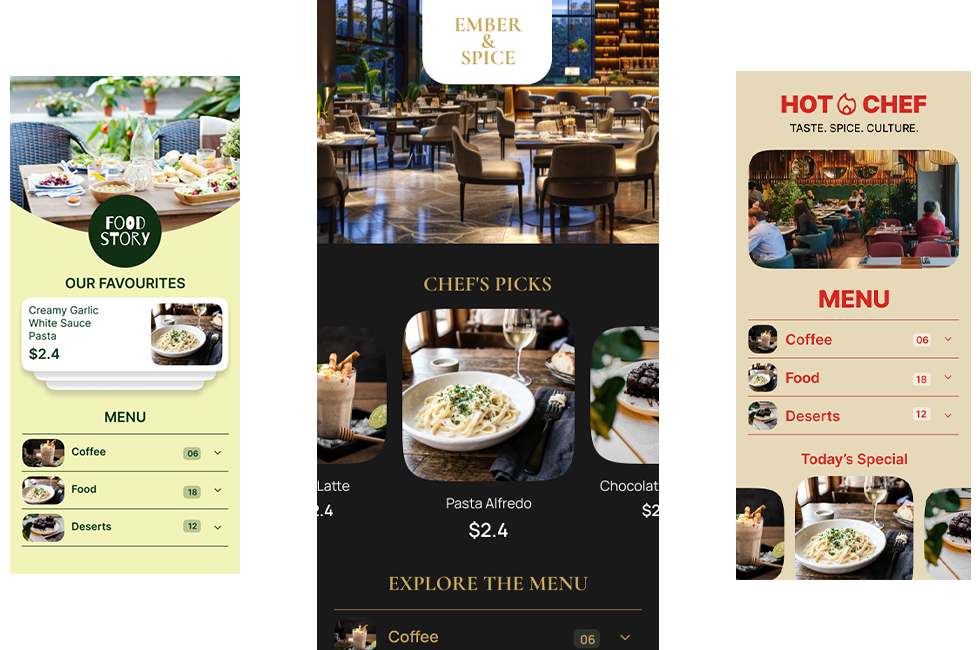
A restaurant menu has an awkward job.
It has to make food look tempting, help guests find what they want quickly, show prices clearly, fit the restaurant’s brand, and still work when the menu changes next week.
A printed menu can do most of that. But once it has gone to print, changing one price means changing the file, sending it for printing, and replacing the old copies.
A digital menu changes that part of the equation.
But there is another problem: a digital menu is only as good as its design.
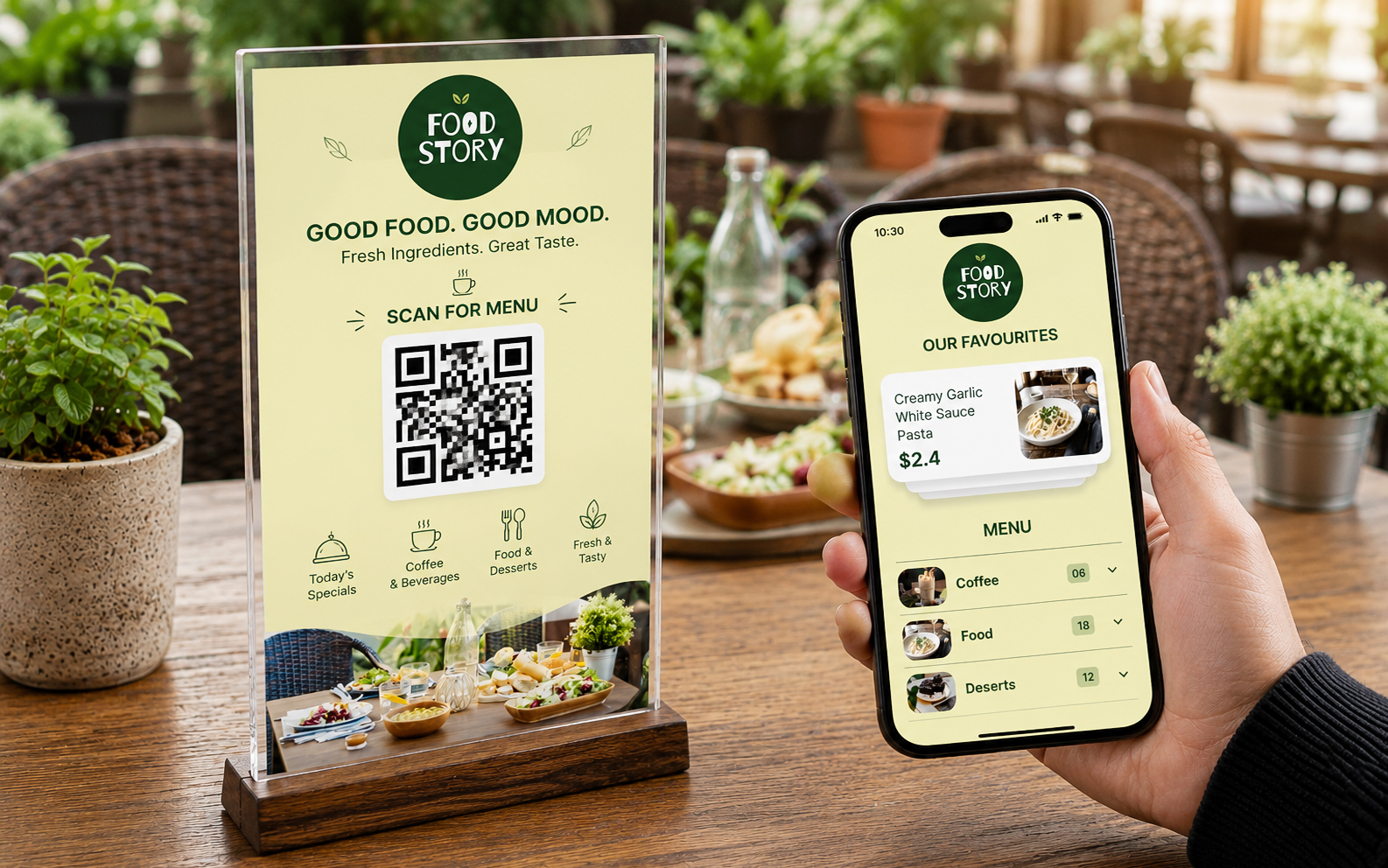
A QR code can take a guest to a menu. That doesn’t automatically make the menu easy to use or appealing.
That is why we approach digital menu card templates differently at MenuFly. The goal is not simply to make a menu look good on a phone. The goal is to create a menu that works across the entire restaurant experience — from the first QR scan to the final food choice, while still giving the restaurant a print-ready version when needed.
What Makes a Good Digital Menu Card Template?
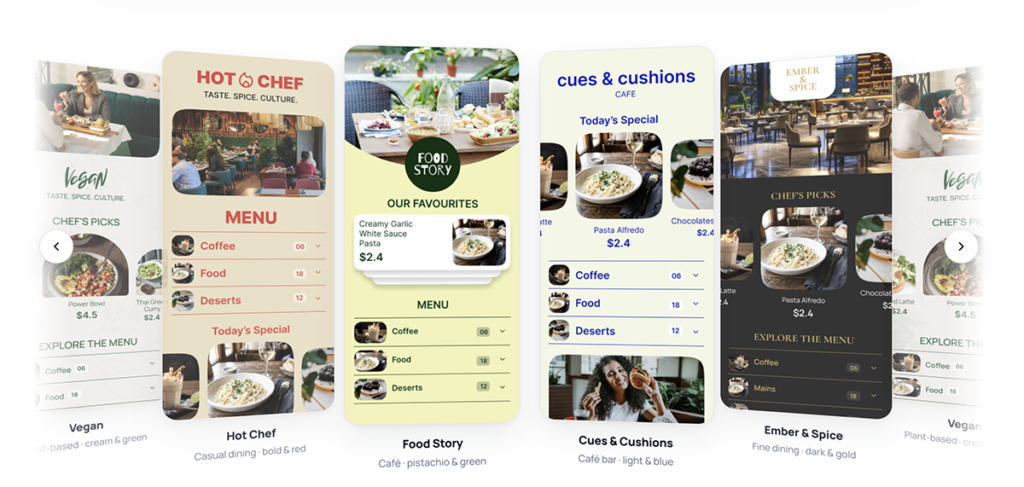
A restaurant digital menu template should do more than provide a background, some fonts, and spaces for food names.
The template should help organize information.
A guest should be able to answer basic questions quickly:
- What kind of food does this restaurant serve?
- What should I try?
- How much does it cost?
- What comes with the dish?
- Is there a photo?
- What are today’s specials?
- Where do I find drinks or desserts?
This is where menu design experience becomes important.
A menu can contain every dish a restaurant sells and still be difficult to use.
The problem is usually not the amount of information. It is the way the information is presented.
A good template creates a visual hierarchy between categories, dish names, descriptions, prices, photographs and featured items.
The guest shouldn’t have to work to understand the menu.
A Digital Menu Should Be Designed for the Phone First


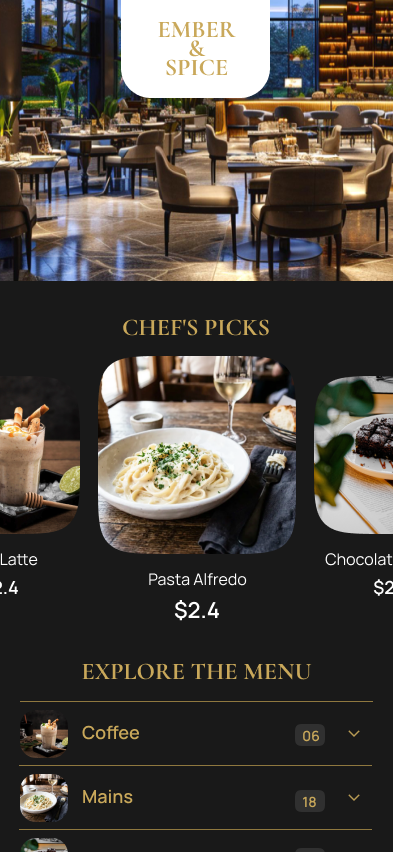
One of the biggest mistakes restaurants make is treating a digital menu like a PDF that happens to open on a phone.
That experience can be frustrating.
A guest scans the QR code, opens the menu, and suddenly has to zoom in and move around a large page just to read the price of a dish.
A proper digital menu should be designed around the way people actually use their phones.
That means:
- Clear category navigation
- Comfortable text sizes
- Easy-to-read prices
- Strong contrast
- Well-spaced menu items
- Food images that don’t overwhelm the screen
- Simple scrolling
- Fast access to important sections
The design should feel natural on a mobile screen.
This is particularly important in restaurants because guests are usually not sitting down specifically to “browse a website.” They are hungry and trying to decide what to order.
That changes how the menu should be designed.
Food Photography Can Do More Than Decorate the Menu
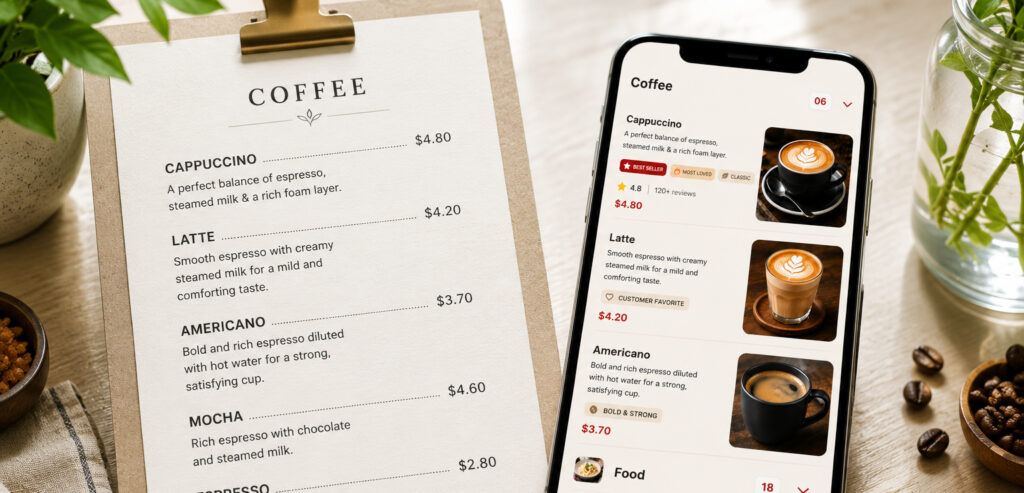
A food photograph isn’t just an attractive element.
It can help a guest understand what a dish looks like before ordering it.
For example, a restaurant might have a menu item called “Smoked Paneer Platter.” The name tells the guest something, but a good photograph can communicate the portion, presentation and overall style of the dish much faster.
This is why we recommend using photos selectively rather than adding a photograph to every item simply because the digital menu allows it.
Too many images can make a menu feel crowded.
Too few can make it difficult to visually understand the restaurant’s signature dishes.
A better approach is to give more visual attention to:
- Signature dishes
- Chef recommendations
- Best-selling items
- New dishes
- Special combinations
- Desserts
- High-value items
The menu becomes more than a list.
It becomes part of the way the restaurant presents its food.
What About Videos in a Digital Menu?
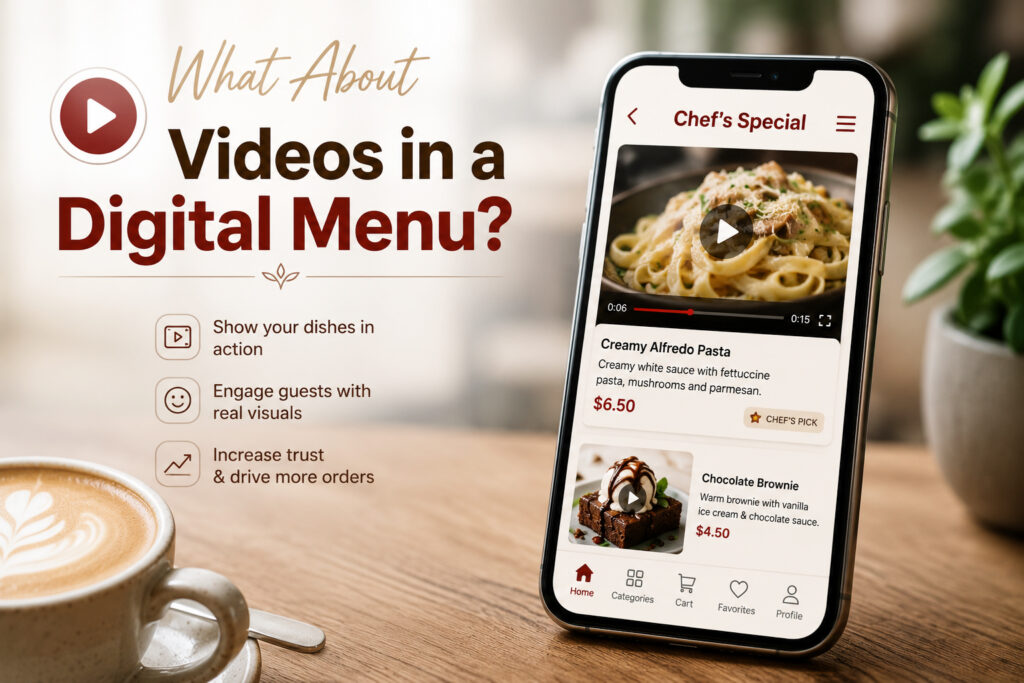
This is one area where digital menus have an advantage over traditional printed menus.
A printed menu can show a photograph.
A digital menu can potentially show movement.
A short video of a pizza coming out of the oven, a dessert being plated, a coffee being prepared, or a signature dish being served can give the guest a sense of the experience behind the food.
But video should be used carefully.
A restaurant does not need a video attached to every menu item.
Instead, use video where movement adds something that a photograph cannot easily communicate.
For example, a short video can work particularly well for:
- Signature dishes
- Live cooking
- Desserts
- Beverages
- Coffee preparation
- Restaurant specials
- Chef recommendations
The important part is that the video should support the menu rather than slow the guest down.
The Menu Should Be Easy to Change
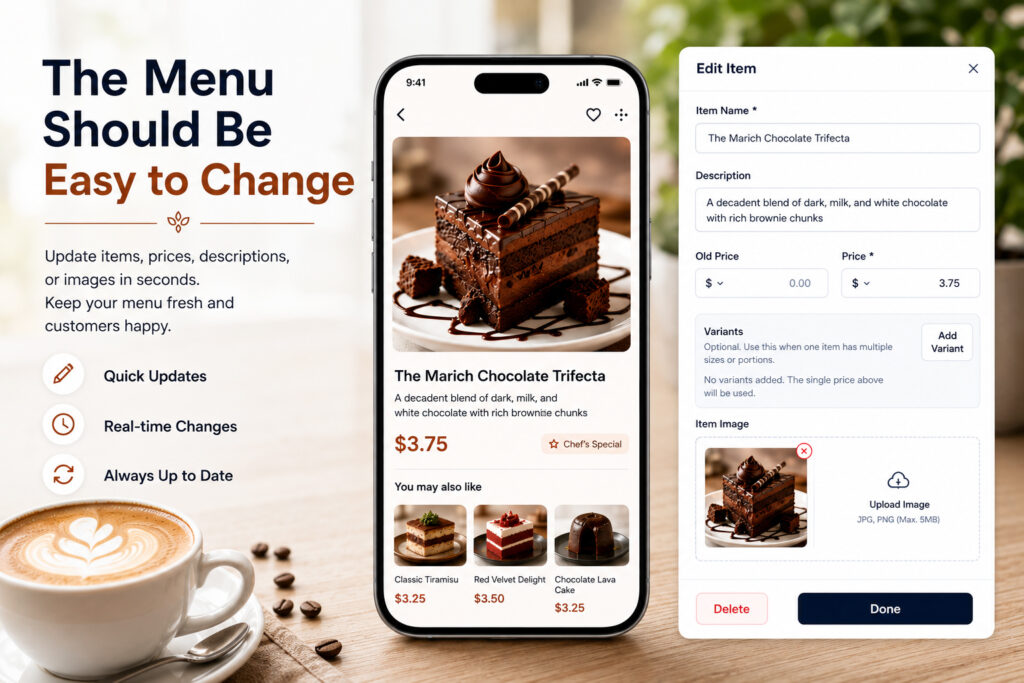
This is one of the biggest reasons restaurants move from traditional menus to digital menus.
Restaurant menus change.
Prices change.
A dish gets removed.
A new dish is introduced.
A seasonal special appears.
Something goes temporarily out of stock.
A printed menu doesn’t handle these changes very well.
A digital menu can.
With a digital menu, the restaurant can update the information without having to redesign and reprint every physical menu.
This is particularly useful for restaurants that frequently change:
- Prices
- Seasonal dishes
- Lunch menus
- Weekend specials
- Combo offers
- Availability
- Beverage selections
The QR code can remain the same while the menu behind it changes.
That small difference can make the menu much easier to manage.
But You Don’t Have to Abandon Printed Menus
Going digital does not necessarily mean throwing away printed menus.
In fact, we think restaurants should have both.
Some guests prefer looking at a physical menu.
Some restaurants need printed menus for particular tables, events, takeaway counters, hotel rooms or backup situations.
That’s why a useful digital menu system should also support a print-ready PDF.
The important idea is to avoid maintaining two completely different menu designs.
Ideally, the digital menu and printed menu should come from the same design system.
For example:
One menu → digital version → QR code → print-ready PDF
That means the restaurant can maintain its menu digitally while still having a professional file ready when printing is required.
This is one of the ideas behind MenuFly.
We don’t see digital and print as competing formats.
They are two ways of presenting the same restaurant menu.
Why Reprinting Every Small Change Gets Expensive
Imagine a restaurant has 20 printed menus.
The price of several dishes changes.
The restaurant now has a choice: continue using the old menus, manually correct them, or redesign and reprint them.
None of those options is particularly attractive.
Now consider a restaurant that changes its menu several times a year.
The cost isn’t only the paper and printing.
There is also the time spent preparing the updated file, checking the artwork, coordinating printing and replacing the old menus.
A digital menu removes much of that repeated work.
The physical menu can remain available when required, while the digital version becomes the easier place to maintain the latest information.
The goal isn’t necessarily to eliminate printing.
The goal is to stop reprinting when you don’t need to.
Analytics Make the Digital Menu More Useful
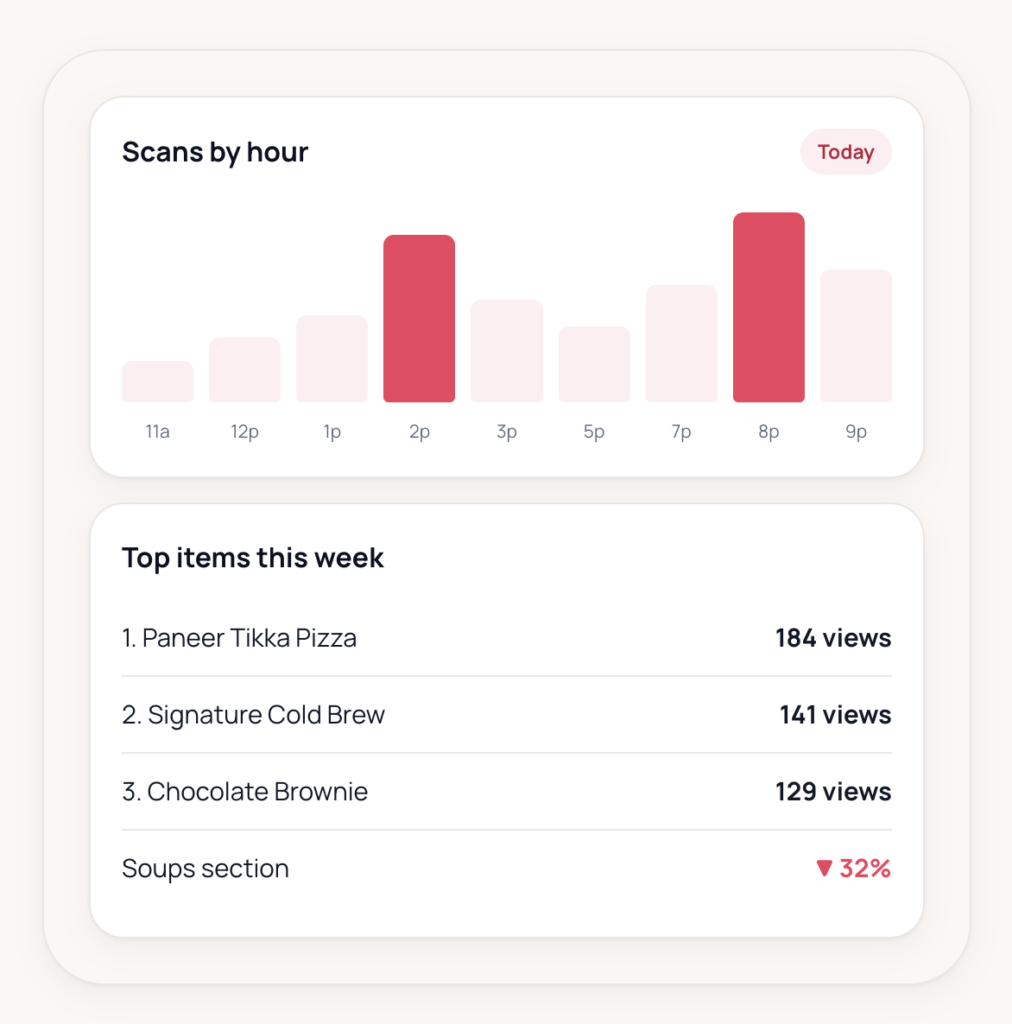
There is another advantage that a printed menu cannot provide easily: data.
A physical menu can tell you what is printed.
A digital menu can provide insight into how guests interact with it, depending on the analytics available in the platform.
For example, restaurant owners may want to understand:
- How many people are viewing the menu
- When menu traffic is highest
- Which sections receive attention
- How guests interact with the digital experience
- Whether particular promotions receive engagement
This can turn the menu from a static design into a useful source of information.
For a restaurant owner, that creates an interesting possibility.
Instead of asking only, “Does my menu look good?”
You can start asking:
“How are my guests using my menu?”
That is a much more useful question.
Choosing a Digital Menu Template for Your Restaurant
There isn’t one perfect template for every restaurant.
A premium hotel restaurant may need a very different visual language from a casual café.
A bakery may want large product photography.
A fine-dining restaurant may need more whitespace and a restrained layout.
A casual Indian restaurant may need to organize a large number of dishes without making the menu feel overwhelming.
A beach café in the Gulf may have completely different visual requirements from a family restaurant in India.
So instead of choosing a template simply because it looks attractive, consider the restaurant first.
Café
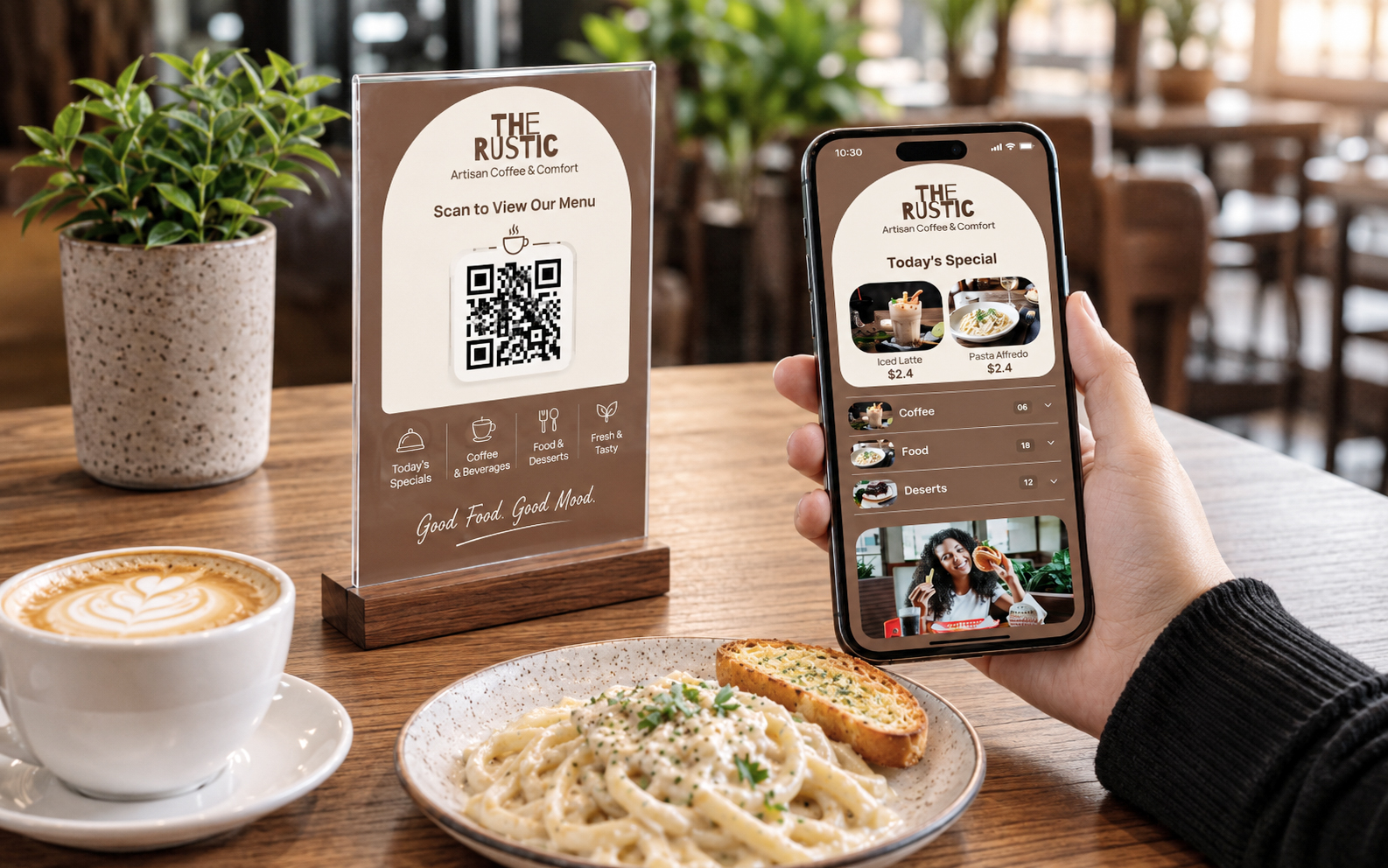
A café menu can benefit from:
- Strong beverage photography
- Simple categories
- Featured combinations
- Dessert highlights
- Clean typography
Restaurant
A larger restaurant may need:
- Clear category navigation
- Multiple menu sections
- Signature dish highlights
- Vegetarian/non-vegetarian indicators where relevant
- Strong food photography
- Easy price scanning
Bakery
A bakery can make more use of:
- Product photography
- Seasonal collections
- Cakes and custom orders
- Featured products
- Visual categories
Hotel or Premium Restaurant
A hotel restaurant may benefit from:
- More spacious layouts
- Premium typography
- Strong brand consistency
- Multiple meal categories
- Beverage and wine sections where applicable
- Multilingual considerations
The template should adapt to the restaurant.
The restaurant should not have to fight against the template.
Common Digital Menu Design Mistakes
1. Making the menu look like a desktop website
A menu opened on a phone needs different spacing, typography and navigation.
2. Using too many decorative elements
Design should support food discovery.
If decorations compete with dish names and prices, they are doing the opposite of what they should.
3. Adding every photograph available
More photographs don’t automatically create a better menu.
Select the dishes where photography actually helps.
4. Treating the QR code as the entire digital strategy
The QR code is simply the doorway.
The experience after scanning is what matters.
5. Forgetting about printed menus
Even restaurants that primarily use digital menus can benefit from keeping a print-ready PDF available.
6. Designing only for launch day
A restaurant menu is not a one-time design project.
It changes.
The system should make those changes easy.
Digital Menus for Restaurants Worldwide
Every restaurant has a different menu, brand, cuisine, and way of serving guests. But the basic requirement is the same: the menu should be easy to understand, easy to navigate, and visually appealing on any device.
A restaurant may have a small café menu with 20 items, while another may have multiple cuisines, hundreds of dishes, combo meals, beverages, desserts, and daily specials.
A good digital menu template needs to handle that difference.
It should give restaurants the flexibility to organize categories, add food photography and videos, highlight signature dishes, update prices, and present their brand consistently without forcing every restaurant into the same layout.
That’s why MenuFly is designed as a worldwide digital menu solution for restaurants.
Whether you’re running a café, hotel restaurant, bakery, fine-dining restaurant, cloud kitchen, or casual dining business, the goal remains simple: make your menu easier for guests to explore and easier for your team to manage.
Why We Designed MenuFly’s Templates Differently
MenuFly comes from a design-first perspective.
With more than 15 years of design experience and a focus on restaurant design, we have seen that a menu is not simply a document containing dish names and prices.
It is a sales and communication tool.
That is why our digital menu card templates are designed around the restaurant experience.
The idea is simple:
Make the menu beautiful enough to represent the brand, clear enough to use quickly, and flexible enough to change.
With MenuFly, restaurants can create a digital menu, use food photos and videos, manage their menu online, view available analytics, and keep a print-ready PDF version when physical menus are needed.
That gives the restaurant one menu system instead of creating separate files for every situation.
The Better Way to Think About a Restaurant Menu
The question isn’t really:
“Should my restaurant use a printed menu or a digital menu?”
A better question is:
“How can I create one menu that works wherever my guest needs it?”
At the table, the guest might scan a QR code.
At another table, someone might prefer a printed menu.
A customer might find the menu through a link.
The restaurant might need a PDF for printing.
The owner might need to change a price tomorrow.
The marketing team might want to promote a new dish.
These are all different situations, but they don’t need completely different menu designs.
A well-designed digital menu system brings them together.
Frequently Asked Questions
What is a digital menu card template?
A digital menu card template is a pre-designed layout that restaurants can customize with their own logo, colors, food items, descriptions, prices and images. It provides the visual structure for an online or QR-based restaurant menu.
Can I add photos to a digital restaurant menu?
Yes. Food photos can be added to highlight signature dishes, specials, desserts, beverages and other items where visual presentation can help guests make a decision.
Can a digital menu include videos?
A digital menu can support video content when the platform provides that capability. Short videos can be useful for showcasing food preparation, signature dishes, beverages or restaurant specials.
Can I still print my digital menu?
Yes. A digital-first menu can also have a print-ready PDF version. This allows restaurants to keep physical menus available without maintaining an entirely separate menu design.
Do I need to redesign my menu every time a price changes?
Not necessarily. With a digital menu, prices and menu information can be updated online rather than requiring a complete physical reprint every time a small change is made.
Are digital menu templates suitable for hotels and cafés?
Yes. Templates can be adapted to different restaurant formats, including cafés, hotels, bakeries, casual restaurants and premium dining establishments. The important part is choosing a layout that matches the menu size, brand and customer experience.
Can restaurants use digital menus in India and Gulf countries?
Yes. Digital menus can be used across both markets. Restaurants should consider factors such as menu size, language requirements, pricing, cuisine, customer expectations and mobile usability when choosing their design.
Final Thought
A restaurant menu should not become outdated the moment it is printed.
Your food changes. Your prices change. Your specials change. Your restaurant grows.
Your menu should be able to change with it.
That is the idea behind MenuFly’s digital menu card templates: design once, keep improving, and use the same menu wherever your guests need it.
Go digital where it makes sense. Keep a print-ready version when you need it. Add photos when they help. Add video when it adds something. And use menu analytics to understand the digital experience better.
Because a good menu shouldn’t just tell guests what you serve.
It should help them crave it.
Create Your Restaurant’s Digital Menu
Explore MenuFly’s restaurant-focused digital menu templates and create a menu that is designed for mobile, ready for your guests, and available as a print-ready PDF when you need it.
Leave a Reply