There is a strange thing happening in restaurants.
The food changes.
The prices change.
The chef changes specials.
New dishes appear.
Old dishes disappear.
Combo offers come and go.
But the menu?
The menu often stays exactly the same.
Until someone finally notices that the paneer tikka is ₹320 everywhere except on the menu, where it is still ₹280.
Then comes the familiar conversation:
“We need to change the menu.”
Someone opens an old design file.
Someone searches for the latest food photos.
Someone asks for the updated prices.
The designer makes changes.
A PDF is approved.
The restaurant prints it.
And a few months later, the same cycle starts again.
Maybe the real problem isn’t printed menus.
Maybe the problem is that restaurants are still treating the menu like a finished document.
A menu is not a document
Think about what a menu actually does.
It tells customers what you sell.
It tells them what things cost.
It helps them decide what to order.
It represents your brand.
It can introduce new dishes.
It can highlight profitable items.
It can influence what customers notice first.
And, most importantly, it changes.
So why should the menu behave like a static document?
A restaurant’s menu is closer to a living product than a PDF.
The restaurant changes.
The menu should change with it.
That doesn’t mean every restaurant needs to throw away its printed menus and put a QR code on every table.
It means something more useful:
The restaurant should have one menu that can live in multiple places.
On paper.
On a phone.
Behind a QR code.
On a website.
Inside a takeaway package.
On social media.
And wherever else the customer discovers the restaurant.
The QR code isn’t the menu
This is where the restaurant industry has made things unnecessarily complicated.
We started calling the QR code itself a “QR menu.”
But a QR code is only a doorway.
That’s it.
A QR code doesn’t make a menu digital.
It simply takes a customer somewhere.
What matters is what they see after scanning.
If the customer scans a QR code and opens a badly formatted PDF that requires zooming, scrolling and searching, the restaurant technically has a digital menu.
But it doesn’t necessarily have a good digital experience.
The difference is important.
A QR code is technology.
A menu is communication.
And the experience between the two is what matters.
The PDF problem
PDFs are excellent for printing.
They were designed to preserve a document’s layout.
That’s exactly why designers love them.
A beautifully designed A4 menu can be exported as a PDF and sent to a printer.
Perfect.
But now put that same A4 PDF on a 6-inch smartphone.
Suddenly, the customer has to pinch.
Zoom.
Scroll.
Rotate.
Zoom again.
A menu designed for paper isn’t automatically a menu designed for a phone.
That’s why a digital restaurant menu should be designed for the screen, not simply uploaded as a PDF.
The customer should be able to open it and immediately understand:
Where am I?
What can I order?
What looks good?
How much does it cost?
No instructions required.
No tutorial required.
Just a good menu.
But printed menus aren’t going away
And they shouldn’t.
This is where the conversation often becomes too extreme.
Every few years, someone announces that a new technology is going to eliminate something familiar.
QR menus were supposed to replace printed menus.
They didn’t.
And they probably won’t.
Because a physical menu does something digital can’t completely reproduce.
It exists on the table.
A beautifully designed menu can be part of the restaurant’s atmosphere.
The paper.
The size.
The photography.
The typography.
The cover.
The texture.
The way it feels in the customer’s hand.
A premium restaurant may spend thousands creating its interiors, lighting and furniture.
The menu is sitting right there in the customer’s hands.
Why would you treat it like an afterthought?
The smarter approach isn’t:
Printed OR digital.
It’s:
Printed AND digital.
But there is an important difference.
They shouldn’t be two separate menus.
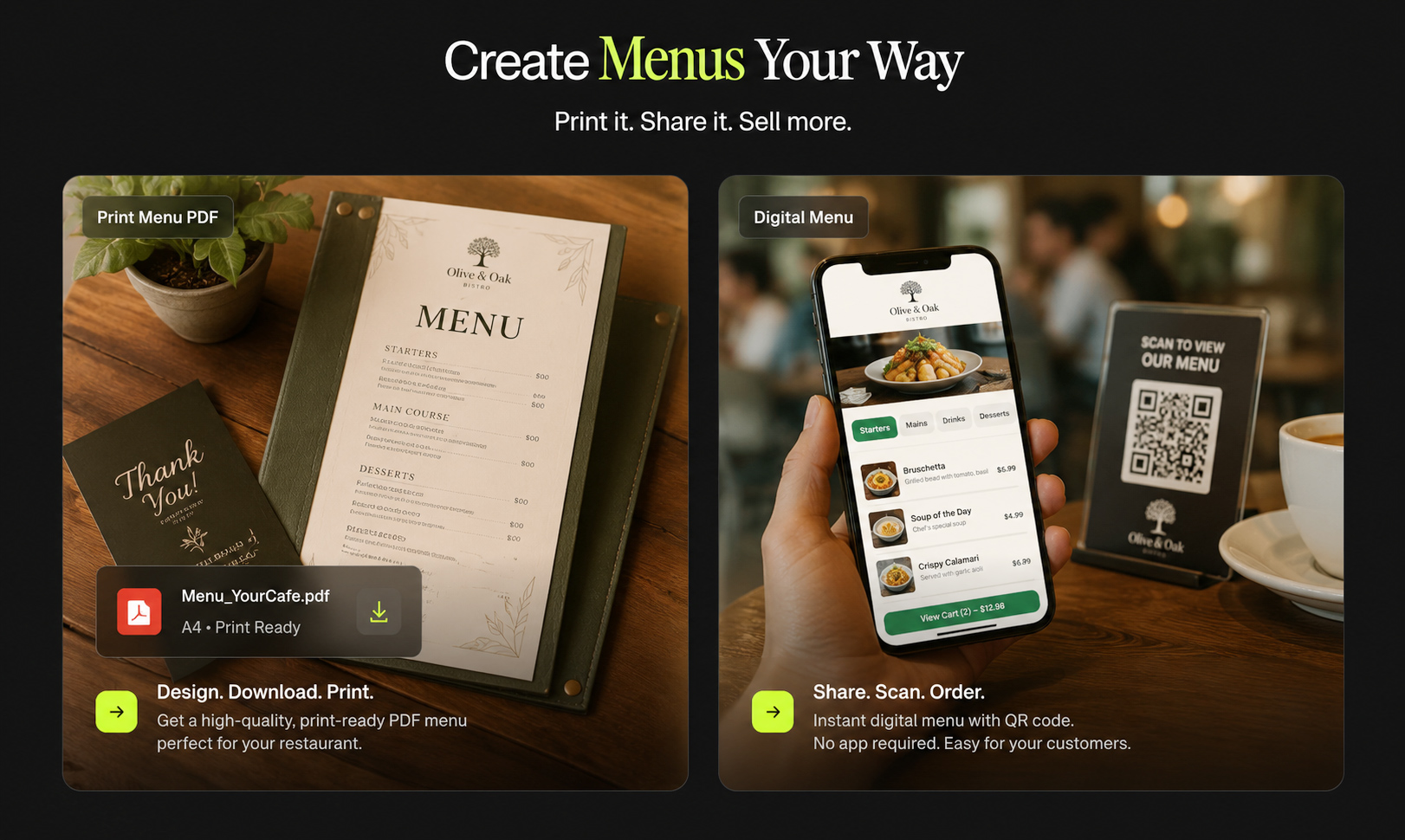
One menu. Multiple experiences.
Imagine a restaurant creates its menu once.
That menu contains:
- Categories
- Dishes
- Prices
- Descriptions
- Food images
- Add-ons
- Specials
- Restaurant branding
Now imagine the restaurant can use that same menu in different formats.
At the table
A beautifully designed printed menu.
On the phone
A mobile-friendly digital menu.
On the table stand
A QR code that opens the digital menu.
On WhatsApp
A link customers can open before visiting.
On Instagram
A link to explore the menu.
For printing
A print-ready menu file.
Now the restaurant isn’t managing six different menus.
It is managing one menu with multiple outputs.
That’s a fundamentally better way to think about restaurant menus.
The menu should have a source of truth
This might sound like a small operational detail.
It isn’t.
If a restaurant has:
- One printed menu
- One PDF
- One website menu
- One QR menu
- One Instagram menu
- One old file on a designer’s laptop
which one is correct?
That’s the problem.
Restaurants don’t need more versions.
They need one source of truth.
When the price of a dish changes from ₹299 to ₹329, the restaurant shouldn’t have to remember every place where ₹299 appears.
The menu should be updated once.
Then the digital experience should reflect the change.
The next printed version can use the updated information.
That is how software products work.
Why shouldn’t restaurant menus work the same way?
Your menu changes more than you think
A restaurant owner might say:
“We don’t change our menu very often.”
But look closer.
Maybe the main menu stays the same.
Yet during the year, you change:
January: New breakfast items
February: Valentine’s Day special
March: New combo
April: Summer drinks
June: Monsoon specials
August: Independence Day promotion
October: Festive menu
December: Christmas and New Year specials
Then there are price changes.
Ingredient changes.
Temporary unavailable items.
New photographs.
Chef recommendations.
Limited-time offers.
Your menu may not be completely redesigned every month.
But menu information is constantly moving.
That is exactly why a flexible menu system makes sense.
The hidden cost of an outdated menu
The cost of an old menu isn’t always the printing bill.
There are other costs.
A customer sees an old price.
The customer asks the waiter about it.
The waiter explains the price changed.
The customer feels confused.
Someone has to correct the information.
Or a customer sees an unavailable dish and asks for it.
Or a promotion ends but is still visible.
None of these problems looks huge individually.
But they create friction.
And restaurants already have enough friction.
The menu should remove work from the team, not create more.
A better restaurant menu workflow
A modern restaurant could have a very simple workflow.
Step 1: Build the menu
Create the restaurant’s menu with its branding, dishes, prices and categories.
Step 2: Publish the digital version
Customers can access it from a phone.
Step 3: Create the QR experience
Place QR codes on tables, stands, packaging or other relevant locations.
Step 4: Create the printed version
Use the same menu information to create a professional physical menu.
Step 5: Update when the restaurant changes
A new price?
Update it.
New dish?
Add it.
Dish unavailable?
Remove or hide it.
New special?
Publish it.
The important part is that the menu remains alive after the printing is finished.
That is the shift.
The restaurant menu is becoming a product
Restaurants already understand this concept in other parts of their business.
They don’t print their Instagram account every time they post something.
They don’t redesign their entire website every time they add a new photograph.
They don’t reprint their Google Business Profile when the opening hours change.
Digital systems are designed to be updated.
The menu should be treated similarly.
Your menu is one of the most frequently used customer-facing products in the restaurant.
It deserves a system behind it.
And this changes menu design too
Once we stop thinking of the menu as a piece of paper, the design process changes.
The question isn’t only:
“Does this look good on A4?”
The questions become:
Does it work on a phone?
Can customers find categories quickly?
Can a new dish be added without breaking the layout?
Can prices be updated easily?
Can the same branding work across print and digital?
Can the restaurant promote a special without redesigning everything?
That is a much more useful design challenge.
What restaurants should look for in a digital menu
Don’t choose a digital menu simply because it gives you a QR code.
Look for the things that actually matter.
Easy updates
You should be able to change menu information without rebuilding everything.
Mobile-first design
Customers should be able to browse comfortably on a smartphone.
Restaurant branding
Your digital menu shouldn’t look like a generic template disconnected from your restaurant.
Fast access
Scanning the QR code should get customers to the menu quickly.
Clear categories
Customers shouldn’t have to hunt for starters, main courses, drinks or desserts.
Flexible content
The menu should support descriptions, images, specials and other useful information.
Print compatibility
Digital shouldn’t mean abandoning print.
A good restaurant should be able to maintain both.
This is why MenuFly is built differently
MenuFly isn’t based on the idea that restaurants need to throw away printed menus.
And it isn’t simply about putting a QR code on a table.
The bigger idea is simpler:
Build your menu once. Use it everywhere.
Create a restaurant menu that can work digitally and physically.
Publish it online.
Connect it to a QR code.
Create a printable version.
Update it when your restaurant changes.
Keep the customer’s experience consistent.
Because your restaurant shouldn’t have to maintain separate versions of its menu just because customers interact with you in different places.
The next generation of restaurant menus won’t look like one thing
Some customers will still pick up a printed menu.
Some will scan a QR code.
Some will find the menu through Google.
Some will open it from Instagram.
Some will look at it before visiting the restaurant.
Some will discover a special through a link.
These aren’t different menus.
They’re different entry points into the same menu.
That’s the important shift.
The future isn’t about choosing between paper and pixels.
It’s about creating a menu that can move between them.
Stop thinking about the menu as something you print
A printed menu is an output.
A QR code is an entry point.
A PDF is a file.
A digital menu is an experience.
But your restaurant’s actual menu?
That’s the information and story connecting all of them.
Once you see it that way, the question changes.
You stop asking:
“Should we use a QR menu or printed menu?”
And start asking:
“How should our menu work everywhere our customers interact with us?”
That’s a much better question.
And it leads to a much better menu.
Build Your Restaurant Menu for Print + Digital
With MenuFly, create a restaurant menu that works beyond the table.
Build your menu, publish a digital version, create a QR menu experience and prepare your menu for print—all from a more connected workflow.
One menu. Multiple experiences. Less repetition.
Build your menu. Create a better experience.
Leave a Reply